
High Watermark Values
A high watermark is the last highest value of a field from a source system. DataZen stores that value so future reads can request only what has changed. The watermark is typically a DateTime or timestamp, or an integer or long value. Common examples include a database timestamp column, a monotonically increasing numeric id, or a SharePoint List LastModified field.
A high watermark is usually an optimization that limits extraction to changed data. It is usually not necessary when the source is already a CDC stream or a messaging platform.
Built-in High Watermark Support
In most cases you can use DataZen’s built-in high watermark support. How the value is applied depends on the source system of the reader. For pattern-level guidance, see High Watermark Pattern.
In SQL CDC, the built-in high watermark is supported only for the first SELECT operation
in the script. If you need a high watermark for additional SELECT operations, or you need to
share one watermark across multiple pipelines, use a custom high watermark.
When the built-in feature is used, DataZen saves the watermark automatically if the pipeline completes successfully. Successful completion means:
- Reader-only pipeline — the entire script must succeed.
- Direct pipeline (reader + writer) — the reader portion must succeed, including the
CAPTUREoperation when one is present. The writer portion does not have to succeed for the built-in reader high watermark to be saved.
Order the source query by the watermark field so paging across runs remains consistent. For example:
SELECT * FROM DB [sql]
  (SELECT TOP 250 name, modify_date FROM sys.tables WHERE modify_date > '@highwatermark' ORDER BY modify_date)
  WITH HWM 'modify_date';
Use @highwatermark or @highwatermarknull depending on the source engine’s
null-handling requirements. See
Runtime Variables for details.
Custom High Watermark
Use a custom high watermark when the built-in feature is not enough — for example unsupported data
types, multiple SELECT operations, complex calculations, or a watermark shared by more than one
pipeline. The usual approach is:
- Read the current value with
#getvar()or#trygetvar() - Calculate the next value with a
#data.calc_hwm...function - Persist the new value with
SETinto an environment variable
Basic example using an environment variable named saved_hwm:
-- This script assumes the variable saved_hwm already exists
PRINT 'Initial HWM value: #getvar(saved_hwm)';
SELECT * FROM DB [sql] (SELECT TOP 100 * FROM mytable WHERE id > #getvar(saved_hwm) ORDER BY id );
PRINT 'New HWM candidate value: #data.calc_hwmnumber(id, #getvar(saved_hwm))';
SET @saved_hwm = '#data.calc_hwmnumber(id, #getvar(saved_hwm))';
A more robust example initializes a missing variable, caches the current value in a script parameter, and saves the watermark only after the successful path of the script has completed:
-- declare a script-level parameter to avoid calling #getvar() multiple times
DECLARE @hwm = '#trygetvar(saved_hwm, 0)';
PRINT 'Initial HWM value: @hwm';
SELECT * FROM DB [sql] (SELECT TOP 100 * FROM mytable WHERE id > @hwm ORDER BY id );

PRINT 'New HWM candidate value: #data.calc_hwmnumber(id, @hwm)';
-- do more work... if an error is thrown before SET, the high watermark is not saved

-- Save only after the successful path has completed
-- If the id column is no longer in the pipeline, use #statebag() right after SELECT
-- to keep the candidate value in memory, then read it here instead
SET @saved_hwm = '#data.calc_hwmnumber(id, @hwm)' CREATE SKIP_PREVIEW;
Place the SET near the end of the successful path. If you save the watermark and later
operations fail, the watermark may advance even though later work did not complete.
Shared environment-variable watermarks can be updated by more than one pipeline. Coordinate ownership of the
variable carefully, and note that read-only environment variables cannot be updated with
#setvar() or SET. See
Environment Variables.
View or Edit High Watermark Values
When DataZen stores high watermark values, you can view and edit them in the Web Portal (cloud agents) or in DataZen Manager. If the watermark is managed externally, this feature is not available.
Web Portal
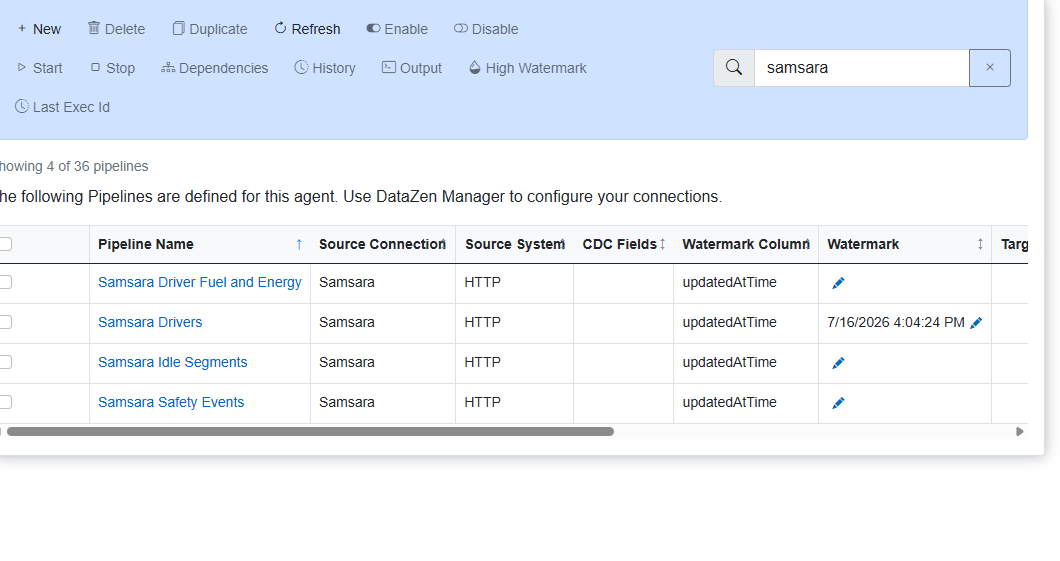
Open Configuration → Pipelines. Pipelines that use a high watermark show the source field under Watermark Column and the current value under Watermark. Edit a value in either of these ways:
- Click the edit icon to the right of the watermark value on the pipeline row.
- Select the pipeline with its checkbox, then click the High Watermark button in the toolbar.
DataZen Manager
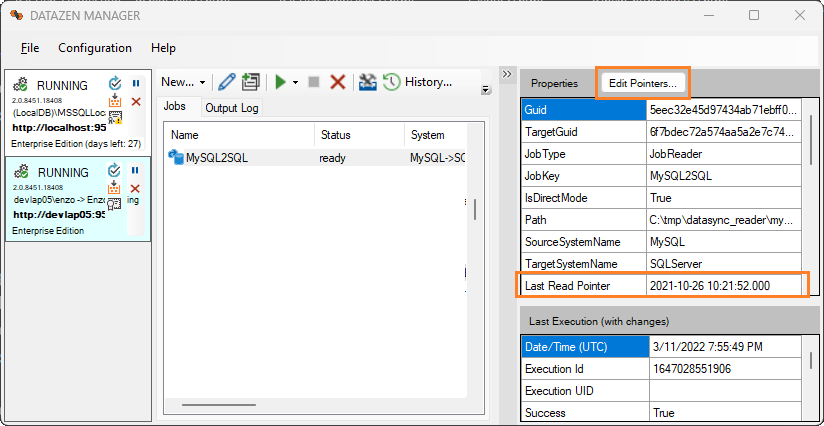
Select a job in DataZen Manager. The right panel shows job settings, including the current high watermark in Last Read Pointer when one is available. If the job holds a high watermark, Edit Pointers is enabled.
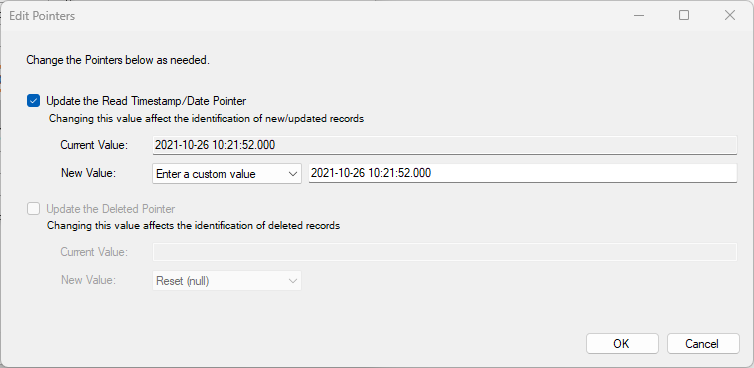
This screen shows Last Read Pointer and Last Delete Pointer when available. You can modify a value as:
- Reset (null) — clears the value so the next run reads available data again
- Date/Time Value — choose a date/time from the picker
- Numeric Value — enter a numeric value
- Custom Value — free-form text
Some jobs hold multiple pointers as an array. When entering a date as free-form text, use
YYYY-MM-DD hh:mm:ss.nnn.
An incorrect pointer value can cause the job to fail or to skip or reprocess data.