
Introduction
Modern organizations move data continuously—from operational databases and SaaS APIs into lakes and warehouses, between on-premises and cloud platforms, and across the business systems that run day-to-day processes. Traditional approaches often require many intermediate stores, separate ETL jobs, and heavy orchestration just to get trusted data where it is needed. That complexity slows delivery, raises cost, and makes change risky.
DataZen is a data pipeline and replication platform designed to reduce that friction. It moves data from virtually any source to virtually any target using an inline ETL model: transform and shape data as it flows, with optional Change Data Capture (CDC) so you forward only what changed. Portable Change Logs decouple capture from consumption, so the same delta can be replayed to lakes, warehouses, applications, or automation endpoints in the shape each consumer expects.
Teams use DataZen in two complementary ways. On greenfield projects, it offers a lighter implementation model that can skip mandatory Bronze and Silver layers when they are not needed. On existing architectures, it extends what you already run—adding sources, CDC, enrichment, or quality steps at clear hook points without a full rip-and-replace. In both cases, the goal is the same: shorter paths from source to outcome, less orchestration overhead, and lower storage and compute waste.
That flexibility also supports a more agile methodology for data work. Whether you are building or evolving a traditional data lake, standing up analytics in a warehouse, or delivering business data integration and process automation across Fintech, Martech, and other platforms, DataZen lets you start small, ship working pipelines quickly, and grow persistence and complexity only when the use case demands it.
DataZen also goes beyond traditional integration. The same governed pipelines that move and shape data can be exposed as MCP Tools for AI Chat and external agents, so organizations unlock natural-language access to operational data, agent-driven operations, and AI-assisted SQL CDC development—without giving LLMs direct access to source systems. See AI & Agentic.
In This Page
Where DataZen Fits
DataZen supports both new builds and existing estates. The table below summarizes the main use cases covered in this section (and agentic patterns described next).
| Use case | When to use it |
|---|---|
| Greenfield | New data platforms and integrations: inline source-to-target pipelines with optional Change Logs, without requiring a full Bronze/Silver stack up front. |
| Enhance existing | Augment current acquisition layers at clear hook points (source, Bronze, or Silver) with CDC, quality rules, HTTP sources, and enrichment—without a full rip-and-replace. |
| Process automation | Synchronize cloud SaaS and on-prem systems (Fintech, Martech, ERP, and custom APIs) for operational processes, not only analytics landing zones. |
| Remote site replication | Run self-hosted agents at distributed sites, normalize at the edge, and forward resiliently to a central hub (files or database) using local Change Logs. |
| Agentic | Use AI with DataZen pipelines: generate scripts and cloud functions, call agents from pipelines, expose pipelines as MCP tools, and administer agents via the DataZen API. |
Greenfield Data Integration Implementations
For new projects, DataZen can serve as the primary ingestion and ETL platform without building out a full
medallion-style stack up front. Instead of landing every extract in a Bronze layer and maintaining
persistent Silver staging tables, pipelines can move data inline from source to target while
optionally retaining compressed Change Logs for audit, replay, or downstream consumers.
Persistent Silver is needed only where you keep lookup tables or state for long-running processes.
Even on greenfield work, teams that prefer familiar patterns can still materialize full Bronze
and Silver layers—DataZen does not force a single persistence model.
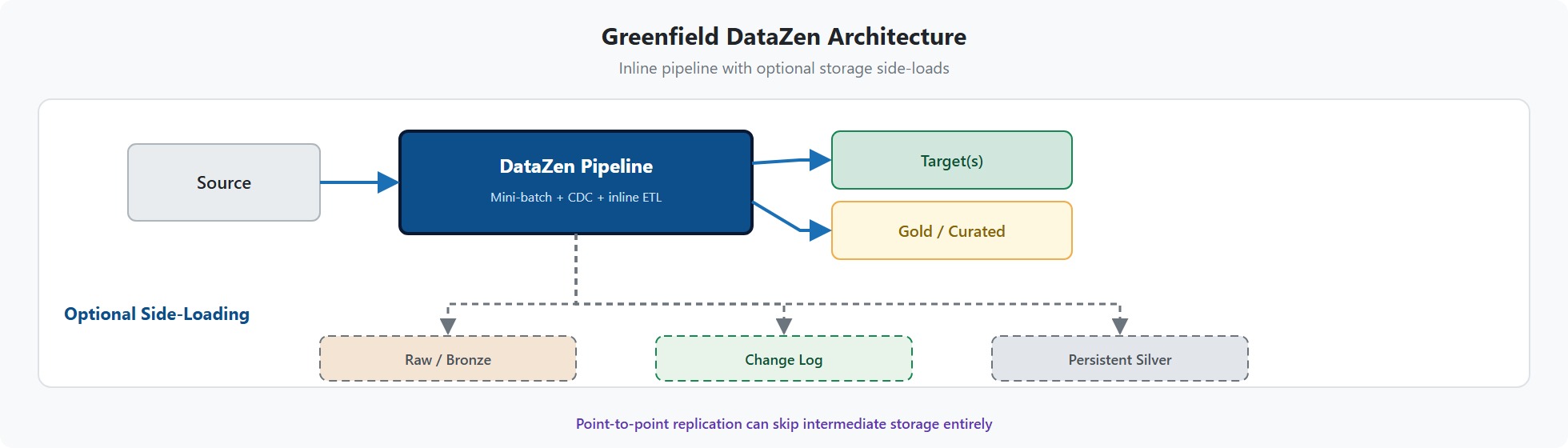
Key benefits compared with traditional layered ingestion:
- Simpler routing — Source, transform, and load run in one inline pipeline instead of chaining separate orchestrators across raw, stage, and curated zones.
- Optional storage, not required layers — Raw archives, change logs, and persistent Silver are side-loads you choose; point-to-point replication can skip intermediate storage entirely.
- Efficient change capture — Change logs store deltas with schema and metadata, typically using far less space than repeated full extracts into a Bronze zone.
- Transient Silver by default — Most shaping runs in auto-created execution tables that match the current schema and are dropped when the job finishes, reducing schema drift and staging-table maintenance.
- Less orchestration overhead — Fewer scheduled jobs, dependencies, and failure points than multi-layer medallion pipelines that must succeed at every hop.
- Schema on write to targets — Deliver business-ready datasets directly to warehouses, lakes, or applications without an extra curated layer when inline ETL is sufficient.
Enhancing Existing Data Integrations
For established environments, DataZen can augment or replace parts of the current acquisition and processing stack without a full rip-and-replace. The most common approach is to insert DataZen at a hook point—a stage where data is already being read or landed—so the rest of the existing architecture can continue to run as usual.
Three typical hooks are shown below. In each case, DataZen can apply inline enhancement and quality enforcement, including calls to external cloud functions and AI agents, before writing the result to the next landing zone.
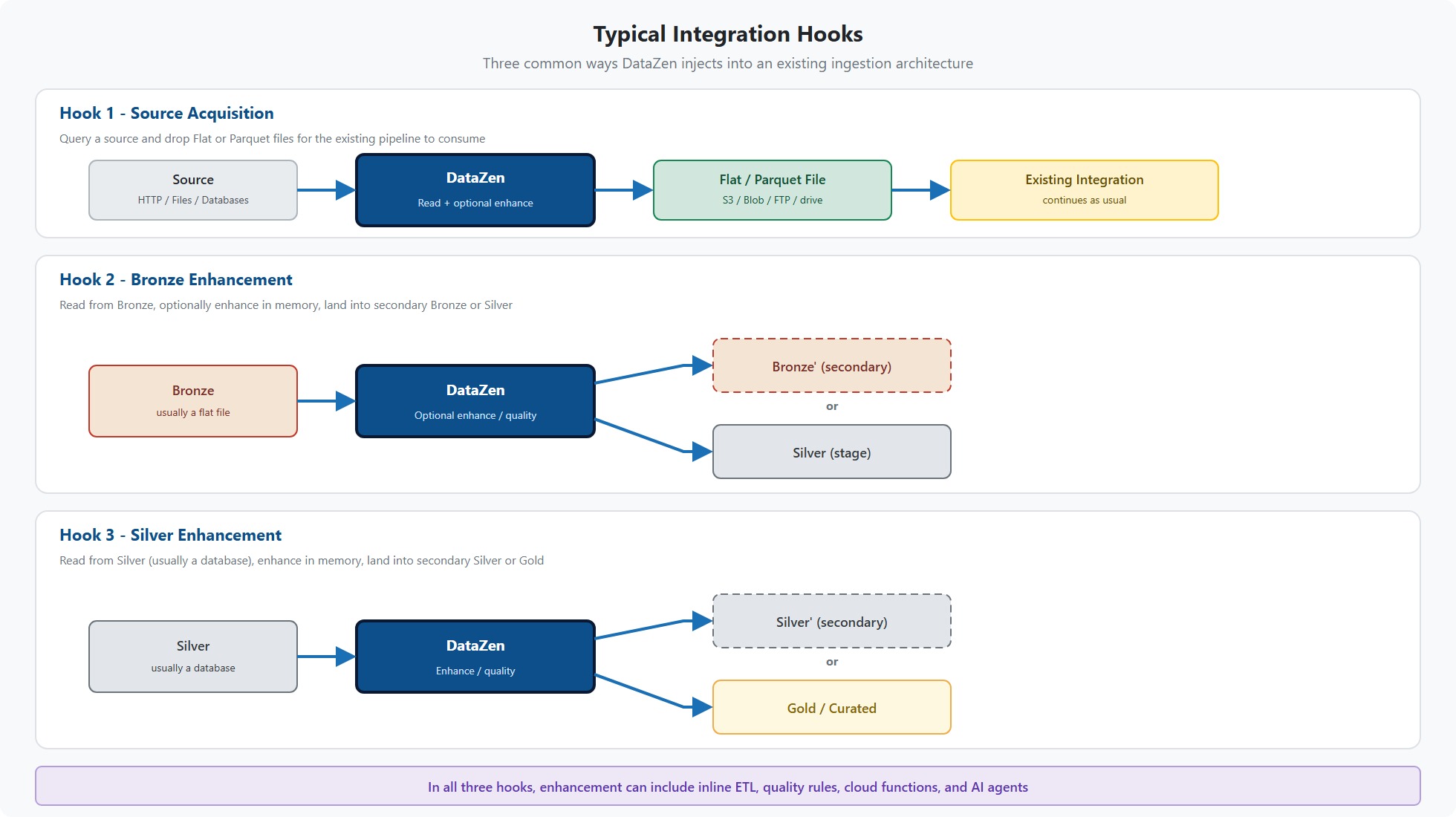
- Hook 1 — Source acquisition — DataZen reads from HTTP, files, or databases and writes Flat or Parquet files to object storage or a drive (S3, Azure Blob, FTP, and similar). From that point, the existing integration continues unchanged.
- Hook 2 — Bronze enhancement — DataZen reads from the
Bronzelayer (normally a flat file), optionally enhances the data in memory, and lands the result into a secondary Bronze zone or directly intoSilver. - Hook 3 — Silver enhancement — DataZen reads from the
Silverlayer (normally a database), enhances the data, and lands it into a secondary Silver zone or directly intoGold.
Beyond these hooks, teams often use DataZen in the following areas:
- HTTP/S sources — Add OData, REST, JWT/OAuth APIs, and custom endpoints quickly. Outputs are often flat or Parquet files ready for existing lakes and warehouses (Snowflake, Fabric, Databricks, and others).
- Cloud functions and agentic integration — Enrich data inline via Azure Functions, AWS Lambda,
or LLM endpoints, then merge results back into the pipeline—including against existing
Bronze,Silver, orGolddatasets. For exposing pipelines to AI agents as MCP Tools, see Beyond Integration: AI and Agentic. - Native, lower-cost ETL — Switch execution to SQL Server, MySQL, Postgres, or similar engines for heavy transforms on cheaper compute, then rehydrate into the in-memory pipeline with automatic cleanup of transient tables—offloading work from premium platforms such as Snowflake or Fabric.
- Built-in change data capture — Replace custom CDC jobs or add CDC to pipelines that today move full batches only, cutting downstream volume and storage by processing changed records instead of full reloads.
Business Process Automation Across Platforms
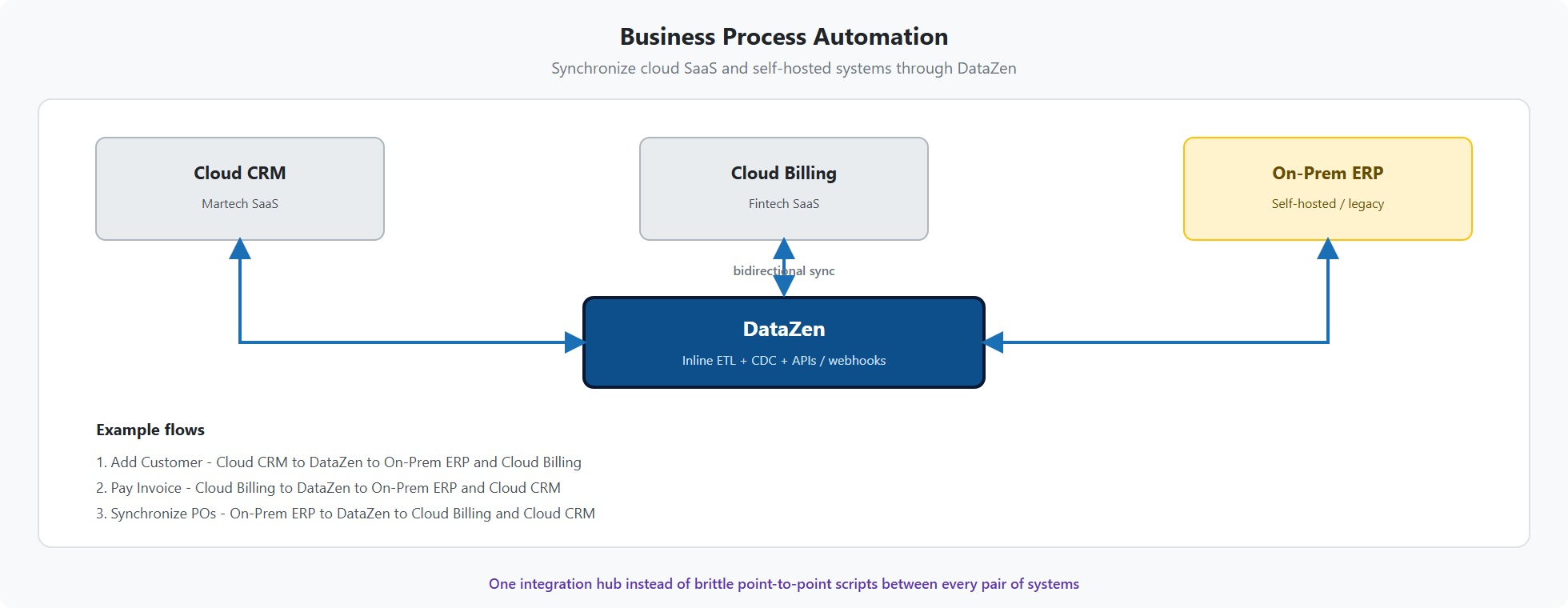
Beyond lakes and warehouses, DataZen plays an important role in business process automation (BPA): moving and shaping data between the systems that run the business—on-premises applications, cloud SaaS, payment and banking platforms (Fintech), marketing and CRM stacks (Martech), ERP, support tools, and custom HTTP APIs. Many of these flows are event- or change-driven, span security boundaries, and must deliver clean, timely payloads to the next step in a process rather than to a curated analytics table.
DataZen simplifies that work by treating automation endpoints like any other source or target. Pipelines can pull from databases, files, and APIs; apply inline validation, enrichment, and quality rules (including cloud functions and AI agents); and push results to webhooks, message consumers, object storage, or downstream applications—with CDC so only meaningful changes trigger the next process. The same portable change logs that support lake ingestion can feed operational consumers, so one capture model serves both analytics and process automation.
The practical benefit is fewer brittle point-to-point scripts and middleware chains. Teams can stand up cross-platform integrations quickly, iterate as business rules change, and keep on-prem and cloud systems in sync without rebuilding a full medallion stack for every operational use case.
Remote Site Replication
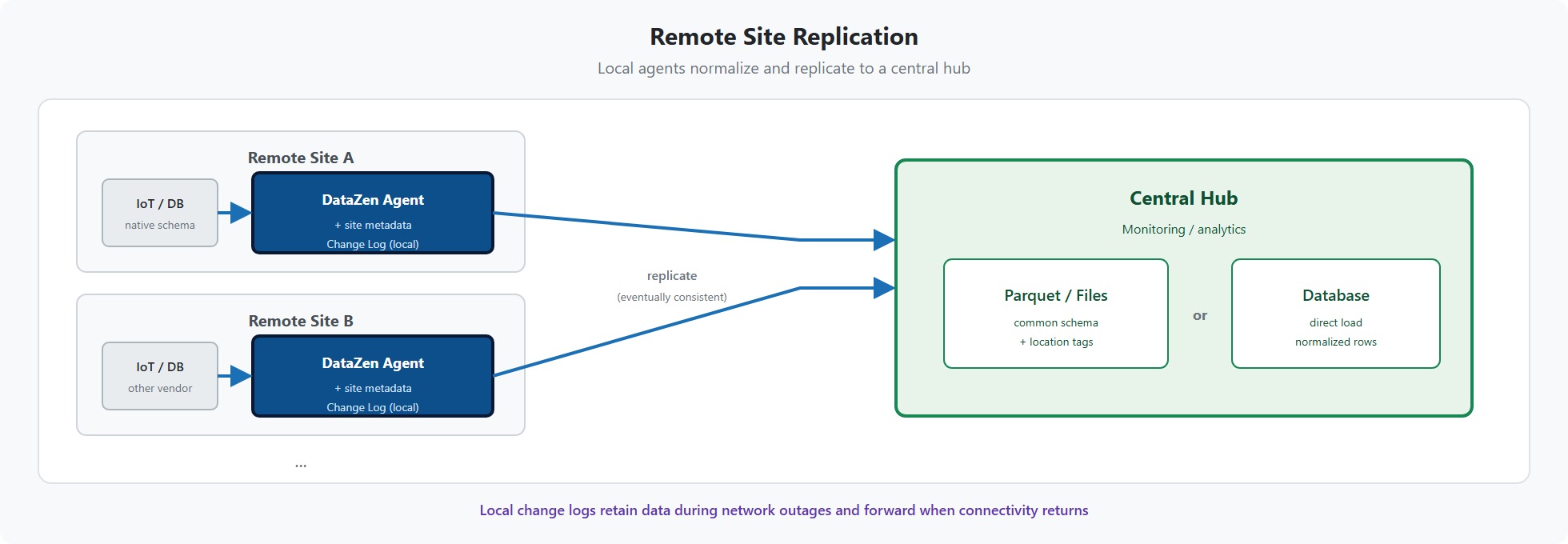
Remote site replication is a specialized pattern for organizations that need to collect data from many distributed locations into a central monitoring or analytics hub. Customers deploy the self-hosted DataZen agent at each remote site and replicate to a central landing zone—typically as Parquet (or other flat) files in object storage, or directly into a central database.
Because pipelines run locally at each site, every location can stamp records with site or location metadata and reshape its native schema into a shared target format. That local shim is especially useful when sites use different IoT devices or vendor systems: normalization happens at the edge, so the central store receives a consistent structure instead of many incompatible feeds.
DataZen Change Logs keep capture resilient when connectivity is imperfect. If the network drops temporarily, changes continue to be recorded locally and are forwarded when the link returns, using an eventually consistent replication model so data is not lost in transit.
Beyond Integration: AI and Agentic
Integration gets data where it needs to go. AI and Agentic capabilities let organizations go further: the same DataZen pipelines that power lakes, warehouses, and business processes become a governed interface for large language models and AI agents—as authors of integration code, as callers of external models, and as tools and APIs agents can invoke under existing security controls.
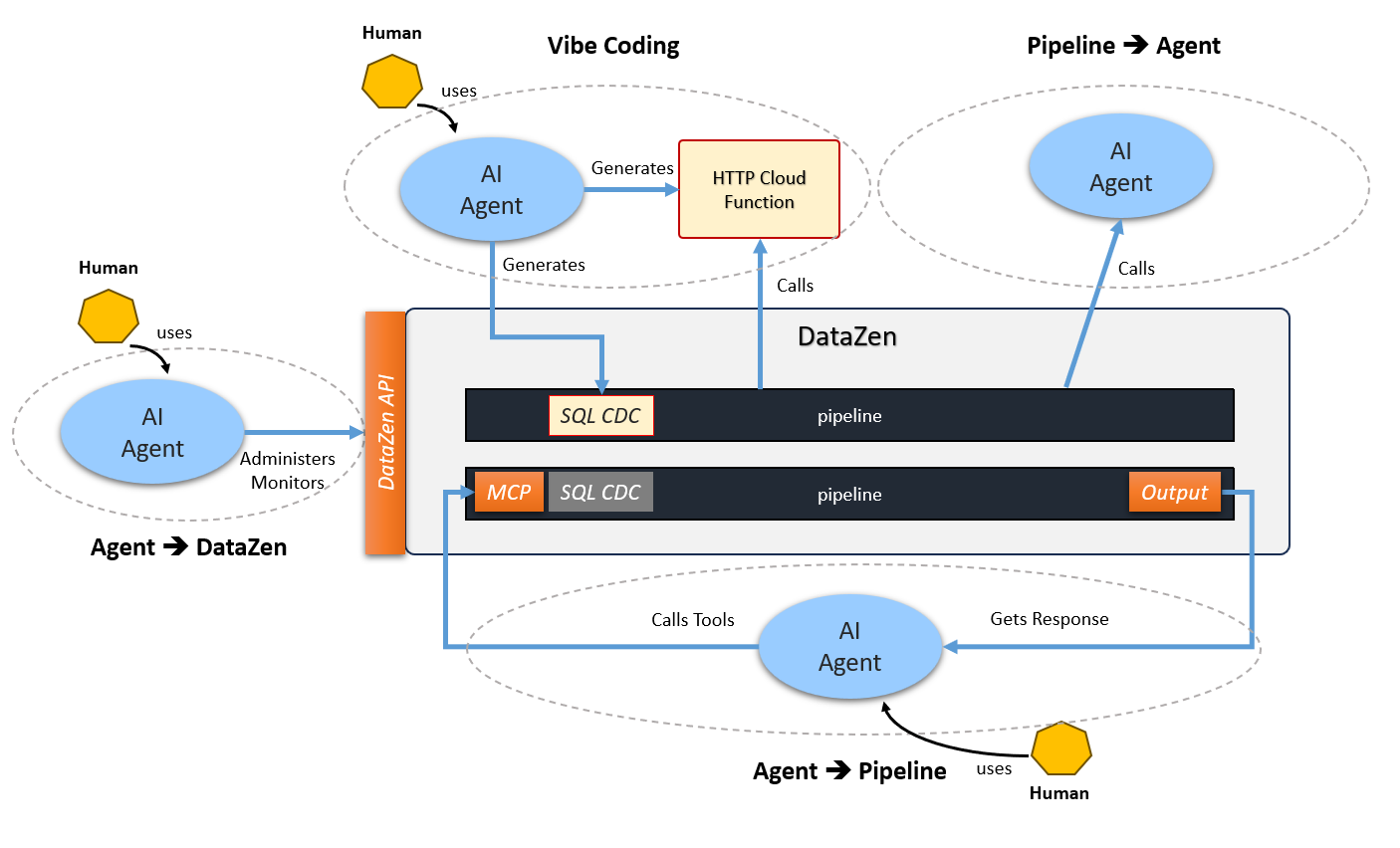
Four complementary patterns cover the main scenarios:
- Vibe Coding — Generate SQL CDC pipelines with your favorite agent (via
datazen-sqlcdc) and build external HTTP cloud functions that pipelines can call. - Pipeline → Agent — A running pipeline invokes an LLM mid-flight with CALL AGENT (no separate MCP package required).
- Agent → Pipeline — Expose Reader or Direct pipelines as MCP Tools so AI Chat and
external agents can call them (
datazen-pipeline-mcp). - Agent → DataZen API — Let agents operate the control plane—jobs, status, history,
and start/stop/activate—through
datazen-api-mcp.
Start with the overview to go deeper: AI & Agentic Overview.
Traditional Ingestion vs. the DataZen Approach
Most enterprise data ingestion today follows a layered design. Whether described as a Medallion architecture (Bronze, Silver, Gold) or as raw / stage / curated zones, implementations built with tools such as Azure Data Factory, AWS Glue, or Apache Airflow typically follow a similar pattern:
- Raw landing — An ingestion layer pushes source data into object storage (Azure Blob, ADLS, S3, GCS) in its native format: flat files, Parquet, JSON, CSV, and so on.
- Silver / staging — A separate ETL layer reads the raw files, applies cleansing and conforming logic, and materializes intermediate tables—often in a SQL environment such as Snowflake, Databricks, Microsoft Fabric, or a dedicated staging database.
- Gold / curated — Additional ETL produces business-ready datasets for replication into data warehouses, semantic models, reporting, and dashboarding.
This framework is well understood and widely adopted, but it carries structural costs. Each layer requires its own orchestration, storage, and schema management. Intermediate tables accumulate over time, creating a schema-bound ETL layer that is expensive to operate and difficult to evolve. Teams must coordinate file formats, table definitions, and pipeline schedules across multiple systems, and even modest schema changes can ripple through every downstream layer.
A critical distinction is how the Bronze / Raw layer participates in the pipeline. In traditional architectures it is inline—a required intermediate store on the critical path. Data cannot move to Silver or Gold until a full extract lands in blob storage first. That makes the raw zone a potential single point of failure: if the landing step fails or falls behind, every downstream layer stalls. It also becomes expensive over time, even on inexpensive object storage, because raw layers typically store complete, undeduplicated extracts rather than change-filtered datasets.
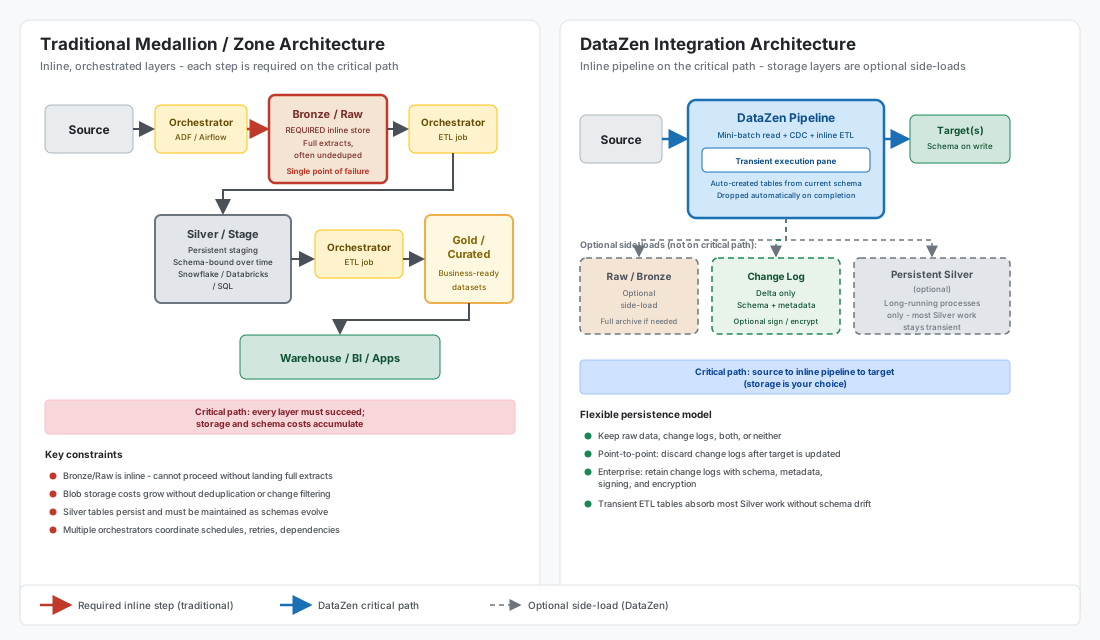
Left: Traditional zone architecture—Bronze and Silver are inline, orchestrated steps on the critical path. Right: DataZen—the pipeline runs inline; raw storage and change logs are optional side-loads.
DataZen changes this model. The raw layer becomes optional—it can still exist when you need a full historical archive, but it does not have to. Instead of landing every extract inline, DataZen can produce change logs: smaller, delta-oriented datasets that carry source schema information, metadata, and—when required—optional signing and encryption. Change logs are also optional and depend on the pipeline:
- Point-to-point scenarios — A change log can be discarded as soon as the target is updated; no persistent intermediate store is required.
- Enterprise replication scenarios — Change logs should be retained as a pure change record, decoupling capture from delivery so multiple targets can consume the same delta over time.
Customers can therefore keep raw data, change logs, both, or neither. When raw storage is used, it becomes a side-loading store rather than an inline, orchestrated dependency—data flows through the pipeline directly while archival copies are written in parallel when needed.
The Silver layer follows the same principle. It remains available for long-running processes that genuinely require persistent staging, but DataZen's transient ETL execution pane allows the vast majority of Silver-layer work to happen inline without durable intermediate tables. When complex SQL is needed, transient tables are created automatically from the pipeline's current schema and dropped when the execution block completes—eliminating the schema drift and maintenance burden that accumulates in traditional staging environments.
DataZen offers a different integration paradigm built around three core principles:
- Direct sourcing — Read from databases, HTTP/S APIs, messaging platforms, cloud drives, and file stores without first landing a full raw copy in blob storage.
- Mini-batch extraction — Use high watermarks and paging windows to retrieve only the records needed for each execution, rather than reprocessing entire datasets on every run. See the Watermark Pattern and Window Capture Pattern for details.
- Inline transformation — Apply ETL logic in memory as data moves through the pipeline, enforcing schema on write at the target when required, instead of maintaining persistent staging schemas across multiple layers.
DataZen does not prevent you from writing to a data lake or warehouse. It changes when, where, and whether intermediate storage exists—inline within the pipeline rather than as mandatory orchestrated layers—so you can side-load raw archives or change logs only when they add value.
Key Concepts
The following concepts underpin how DataZen moves and shapes data. Use this table as a quick map; each topic is covered in more detail below.
| Concept | What it covers |
|---|---|
| Change Capture and Mini-Batching | Read patterns (full, watermark, window, CDC) and building blocks that limit each run to the records that matter. |
| Per-Page Mini-Batching | Paged HTTP and database reads with optional per-page inner pipelines, keeping memory use low for large sources. |
| Inline ETL and the Execution Pane | In-memory transforms with optional switches into database-native SQL via transient tables in the same pipeline. |
| Inline HTTP Data Enhancement | Call external HTTP functions and APIs mid-pipeline to enrich, analyze, or selectively send data, then rehydrate results. |
Change Capture and Mini-Batching
A central reason traditional architectures re-read large raw datasets is the absence of efficient change detection at the source. DataZen addresses this with an advanced Change Capture engine that works alongside mini-batch extraction—reading data in controlled batches rather than monolithic full extracts whenever possible.
At the highest level, four foundational read patterns cover the most common ingestion scenarios. More composite patterns (such as Watermark + CDC for duplicate filtering) are documented in the Patterns Overview.
Common Ingestion Patterns
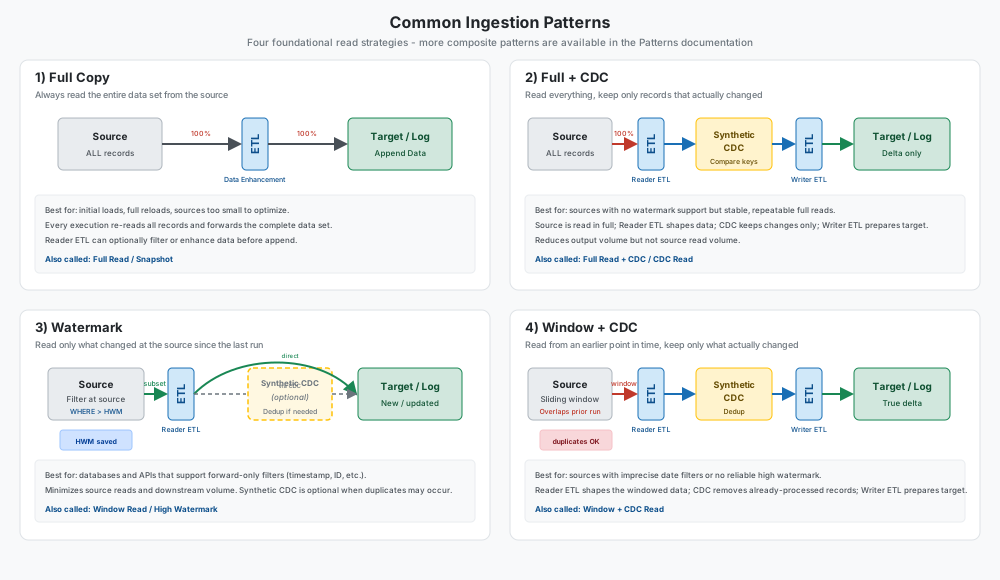
1) Full Copy — Always reads the entire data set from the source on every execution. Best suited for initial loads, full reloads, or small sources where optimization is unnecessary. See the Snapshot Pattern.
2) Full + CDC — Reads the entire data set but applies Synthetic CDC to keep only records that are new, updated, or deleted. Reduces downstream volume while the source is still read in full. See Synthetic CDC.
3) Watermark — Reads only what changed at the source by applying a high watermark filter (timestamp, monotonic ID, and similar fields). Minimizes both source reads and downstream processing. See the Watermark Pattern.
4) Window + CDC — Reads from an earlier point in time using a sliding window that intentionally overlaps with prior runs, then applies Synthetic CDC to keep only records that actually changed. Used when the source cannot support a precise forward-only watermark. See the Window Capture Pattern.
Change Capture Building Blocks
- High watermarks limit each read to records above a previously stored boundary value, enabling efficient forward-only paging over time.
- Synthetic CDC compares key columns across executions to eliminate unchanged records and optionally detect deletions when the source provides no native change feed.
- Native CDC can consume change streams directly from source systems that expose them.
Together, these options dramatically reduce the volume of records processed on each run. Instead of landing a full extract and re-deriving changes in a Silver layer, DataZen identifies what changed at extraction time—or reads only the changed subset at the source—and carries the result forward through the pipeline.
Per-Page Mini-Batching
DataZen supports a batch-oriented read model for HTTP/S and database sources. Rather than loading an entire result set into memory at once, the reader retrieves data in pages—using SQL paging, HTTP offset/limit parameters, or cursor-based APIs—and processes each page before requesting the next.
When paging is enabled, an optional inner pipeline can execute once per page. This allows
ETL operations (schema enforcement, filtering, enrichment, masking, and more) to run on each page
independently, keeping the in-memory footprint small even when the total source data set is very large.
After all pages complete, an optional outer ETL pipeline continues with any remaining transformations,
optionally followed by Synthetic CDC and writer ETL, before capture or push. In
SQL CDC, this is expressed using
APPLY PIPELINE inside a SELECT operation; see
SELECT HTTP for HTTP paging details.
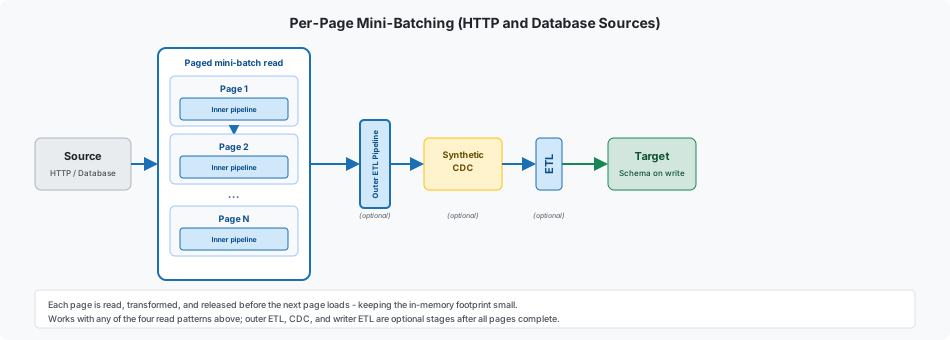
Per-page mini-batching is orthogonal to the four read patterns above—any pattern can be combined with paging. For example, a watermark-based database read can page through changed records in batches, running inline ETL on each page while the high watermark advances across the full execution.
Inline ETL and the Execution Pane
Most DataZen transformations run in an in-memory ETL architecture. As records flow through the pipeline, components such as schema enforcement, filtering, masking, hashing, and HTTP enrichment operate on the current dataset without persisting intermediate tables. When a target requires a defined schema, DataZen applies schema on write at push time rather than maintaining a separate conforming layer.
For transformations that exceed what in-memory processing can handle efficiently—complex JOINs,
aggregations, multi-step SQL logic, or operations against large reference datasets—DataZen can
switch the execution pane from in-memory to database-native ETL inline, directly within
the same pipeline. Using the @pipelinedata() function (see
EXEC), the engine automatically:
- Creates transient tables from the current pipeline schema
- Executes the SQL batch against the selected database engine
- Rehydrates the pipeline with the result set
- Drops the transient tables when the block completes
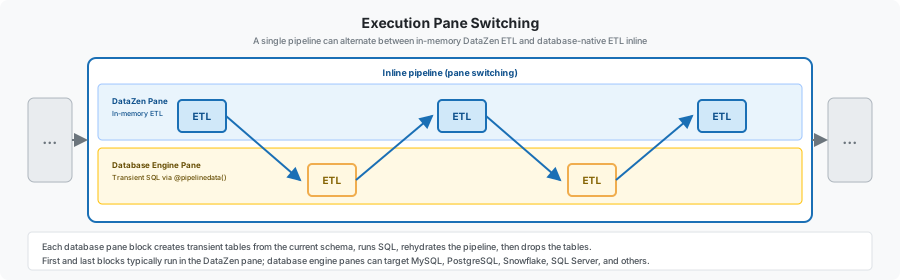
A single pipeline can contain as many ETL execution blocks as needed, and each block can target a different database engine—MySQL, Postgres, Snowflake, SQL Server, and others—without pre-provisioning staging schemas. This execution pane switching gives you the full power of relational SQL where it is needed, while keeping simple transformations lightweight and in memory.
The SQL CDC scripting language exposes this model through commands such as APPLY SCHEMA, APPLY TX, and EXEC. Document-oriented sources can be transformed into relational datasets using document-to-table and CSV-to-table pipeline operations. HTTP-based enrichment is covered in the following section.
Inline HTTP Data Enhancement
Inline data enhancement is often needed when calling external HTTP endpoints that perform calculations on the current pipeline dataset, transform it, enrich it, or consume it for downstream integration needs. Think of this as a dedicated HTTP execution pane—another pane within the same inline pipeline, alongside the DataZen in-memory pane and the database engine pane described above.
As an example, a pipeline could call an external AWS Lambda function to calculate fuel consumption anomalies from real-time fuel readings and return additional fields with the anomaly result for each driver. When the HTTP call completes, the response can optionally rehydrate the pipeline as the new dataset before other ETL operations continue.
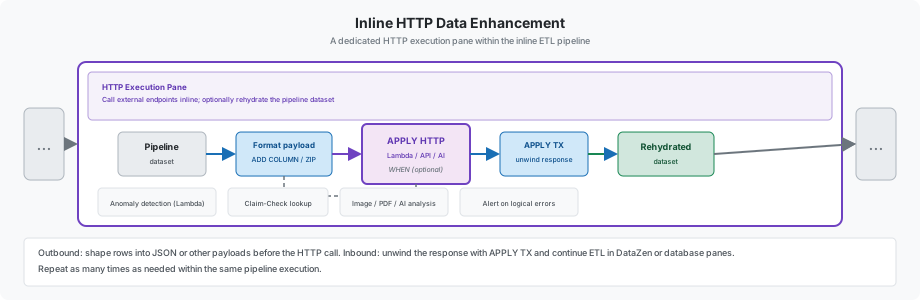
When data must be sent to an external API, it is usually formatted first as a JSON payload or another
supported format. This is typically done with ADD COLUMN
FORMAT operations, optionally followed by
ZIP COLUMN to batch rows into a single payload. After
APPLY HTTP returns, the response can be unwound back into a regular
dataset using APPLY TX. This is one step in the overall pipeline and
can be repeated as many times as needed.
Common use cases include:
- Anomaly detection and enrichment — Send calculated or aggregated pipeline data to cloud functions (AWS Lambda, Azure Functions) or custom REST APIs and merge results back into the dataset.
- Claim-Check pattern — Some HTTP sources return only a unique identifier; use that value in a follow-on HTTP call to retrieve the full payload. See Implementing a Claim-Check Pattern.
- Image and document analysis — Send images to AI vision endpoints, PDF documents to summarization services, or other content to LLM agents for description and classification. See Calling an LLM Inline.
- Selective outbound integration — Use the
WHENsetting onAPPLY HTTPto choose which rows are sent to the endpoint. This is useful when only certain records require external processing—for example, sending alerts to another system when logical errors are detected in the data.
For additional examples, see Calling an HTTP Function.
Advanced Topics
The following table summarizes advanced integration and deployment capabilities. Additional topics will be added here as the platform evolves.
| Topic | Summary |
|---|---|
| Webhooks | DataZen can be invoked by other applications through HTTP/S webhooks. A webhook is always implemented as a Writer Pipeline, which means it depends on change logs—incoming data is captured before processing continues. Exposing a Writer Pipeline as a webhook makes it available for cloud integration scenarios. Because a webhook exposes a pipeline to the network, it should be designed to validate that input is valid and matches expectations before any downstream processing runs. See the Hook Pattern. |
| AI & Agentic | DataZen turns governed pipelines into MCP Tools for Portal AI Chat and external agents, supports inline LLM enrichment, and offers complementary MCP servers for API operations and AI-generated SQL CDC. This capability extends the platform beyond classic integration into agentic workflows. See AI & Agentic, MCP Tool, DataZen API Tools, and AI-Generated SQL CDC. |
| DataZen API | Enterprise customers can use the DataZen API to manage pipelines programmatically, access change logs, retrieve execution history, and obtain debug logs. API access is scope-based; see Security and API Scopes for an overview of available endpoints and permissions. |
| GitHub | Enterprise customers can link a DataZen agent to a GitHub repository to support a more formal release process and track pipeline changes over time. This enables version-controlled pipeline definitions alongside standard software development workflows. |
| Cloud vs. On-Prem | DataZen can run as a pure-cloud pipeline environment managed through an online portal, or as an on-premises service for environments with stricter security or connectivity requirements. The majority of features are available in both deployment models; notable exceptions include certain messaging consumer scenarios and some ODBC capabilities that may differ between cloud and on-prem installations. |