
DataZen Functions
DataZen Functions let you shape field values and parameters in SQL CDC scripts and in classic screen-based pipeline settings. Functions use one of two notations that control when the function runs and therefore its cost relative to the dataset:
| Notation | Evaluation | Cost | When to use it |
|---|---|---|---|
#func() |
Once during evaluation of the operation (or expression context) | O(1) relative to row count | Values that should be the same for every row in that evaluation, or parameters resolved once for the operation |
@func() |
Per row of pipeline data when the command supports row-level evaluation | O(n) relative to row count | Values that must differ per row (for example a unique GUID or a row-specific transformation) |
Because @func() runs once per row, it can have a significant performance impact on large
datasets. Prefer #func() when a single value is enough, or move heavy transformations to an
EXEC operation against a relational engine when performance degrades.
This example uses both notations in an APPLY SCHEMA operation:
APPLY SCHEMA (
    string globalGuid = '#rndguid()'    -- same GUID for all rows (#func = O(1))
    string rowGuid = '@rndguid()'      -- different GUID for each row (@func = O(n))
);
Some operations re-evaluate their expression context once per row or per batch item. In those cases,
even a #func() call can produce different values across rows because the operation itself
runs multiple times. Commands that support this include:
APPLY HTTPwhen using left join or inner joinPROCESSINGmodeEXEC ON DBwhen using thePER_ROWprocessing optionPUSHcommands withBATCH 1PUSHcommands withBATCH Ncombined with an array operator (@concatjson,@concatjsonarr, or@concatxml); see Payload Formatting
Where Functions Are Available
In SQL CDC, functions can appear anywhere an expression or parameter is accepted. In DataZen Manager, functions are also available in classic UI settings such as:
- Data pipeline dynamic columns
- URL or payload of a job that uses an HTTP connection
- Custom SQL or HTTP scripts in a target operation
- Target object names for database tables, NoSQL tables, and file names
- Initialization and finalization database scripts when using a DB target
- Most data pipeline configuration settings
You can nest functions. For example, the following gets the current UTC time, formats it as ISO 8601, and URL-encodes the result:
#urlencode(#toiso8601(#utcnow()))
-- or
#urlencode(#utcnow(s))
Example: DataZen Functions in an HTTP Payload
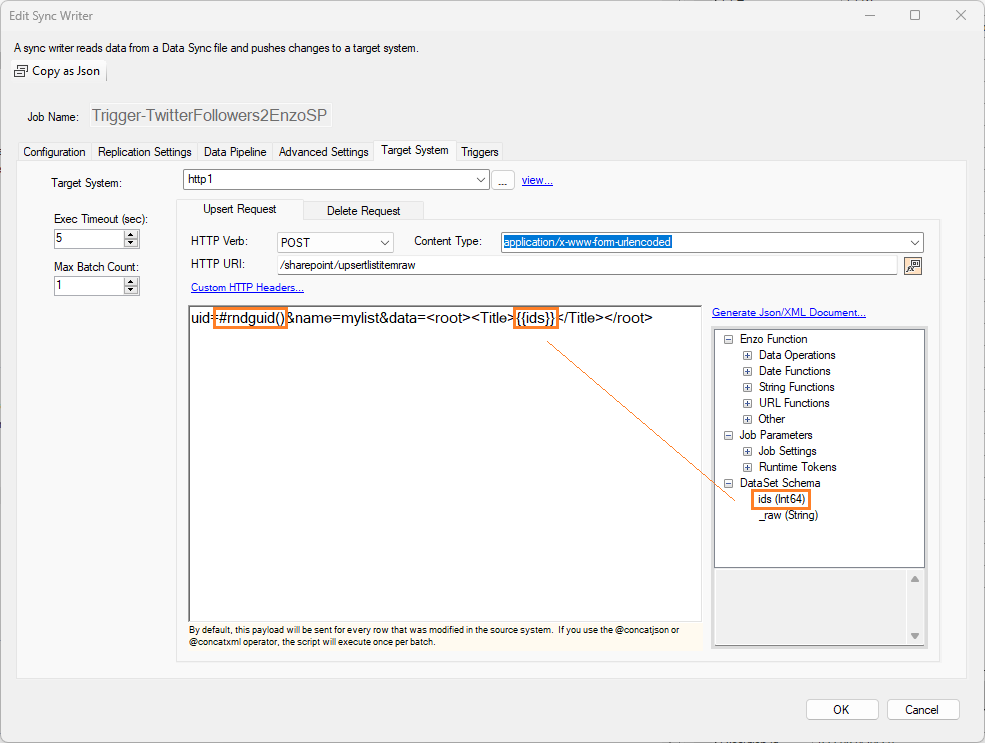
In this example, the HTTP payload sent to the target contains a DataZen Function and a field from the source data:
- a random GUID:
#rndguid() - a field replacement:
{{ids}}
PUSH INTO HTTP [http1] (POST /sharepoint/upsertlistitemraw)
ON_UPSERT
    CONTENT_TYPE 'application/xxx-form-urlencoded'
    PAYLOAD (uid=#rndguid()&name=mylist&data=<root><Title>{{ids}}</Title></root>)
WITH
    BATCH 1;
Manager UI hint: to insert a field or function, place the cursor at the insertion point, then double-click the field or function.
Function Reference
Data Functions
| Function | Description | Comments |
|
#data.calc(a) #data.calc(a, b) |
Performs a data-set calculation using an SQL-like operation and an optional filter. | #data.calc(AVG([age]), age >= 18) |
|
#data.calc_hwm(a, b) #data.calc_hwmdate(a, b) #data.calc_hwmnumber(a, b) |
Calculates the maximum between two values to calculate the next high watermark. Use calc_hwmdate to compare date values and calc_hwmnumber to compare numeric values. | #data.calc_hwmdate(updatedOnFieldName, #getvar(myhwmvar)) |
|
#data.count() #data.count(a) |
Returns the number of records in the data pipeline with an optional filter. | #data.count("age > 18") |
|
#data.sizekb() |
Returns the current data pipeline in-memory footprint in KB. | #data.sizekb() |
|
#data.value(a, b) |
Returns the value of a cell in the data pipeline by providing the row (0-based) and the column name. | #data.value(0, payload) |
|
#decrement(a) #decrement(a, b) |
Decrements a value by one, or by the amount specified. | #decrement({{field1}}, 1) |
| #increment(a) #increment(a, b) | Increments a value by one, or by the amount specified. | #increment({{field1}}, 25) |
| #isnotnull(a,b) | Returns value ‘b’ if value ‘a’ is not a NULL value | You can use this function to replace a non-NULL value with a constant, or the content of another field #isnotnull({{field1}}, 0) |
| #isnotnullorempty(a,b) | Returns value ‘b’ if value ‘a’ is not a NULL value nor an empty string | You can use this function to replace a non-NULL value or non-empty value with a constant, or the content of another field #isnotnullorempty({{field1}}, 0) |
| #isnull(a,b) | Returns value ‘b’ if value ‘a’ is a NULL value | You can use this function to replace a NULL value with a constant, or the content of another field #isnull({{field1}}, 0) |
| #isnullorempty(a,b) | Returns value ‘b’ if value ‘a’ is a NULL value or an empty string | You can use this function to replace a NULL value with a constant, or the content of another field #isnullorempty({{field1}}, 0) |
| #pick(a,b,c…) | Randomly selects a value from the list provided as parameters | Any number of parameters can be provided |
| #rnddouble(a,b) | Generates a random double value between two numbers | Both the lower and upper bound values are required |
| #rndguid() | Returns a new random GUID | |
| #rndint(a,b) | Generates a random integer value (Int32) between two numbers | Both the lower and upper bound values are required |
| #setvar(a,b) | Saves value b in variable a. The variable must exist already for this operation to succeed. If the variable is defined with encryption, the value will be encrypted. | #setvar(totalcount, 1000) |
| #statebag(a) #statebag(a, b) |
Gets or sets a statebag value that can be used as a pipeline variable throughout a pipeline execution. If the key does not exist, this operation returns an empty string, or null if the key name is surrounded by single quotes. |
Sets a statebag value with key TEST of the current datetime #statebag(TEST, #utcnow()) Get a statebag value by its key: TEST #statebag(TEST) Returns an empty string assuming key blahblah was not previously set #statebag(blahblah) Returns null assuming key blahblah was not previously set, assuming this operation is embeded in a SQL command #statebag('blahblah') |
|
#trygetvar(a) #trygetvar(a, b) |
Returns the value stored in an environment variable a if it exists. If the variable is stored encrypted, the value will be decrypted. If the variable doesn't exist, this operation returns b if provided or an empty string. | #trygetvar(totalcount, 0) |
| #trysetvar(a, b) | Saves value b in variable a if the environment variable a exists. If the variable is defined with encryption, the value will be encrypted. | #trysetvar(totalcount, 1000) |
String Functions
| Function | Description | Comments |
|
#compress(a) #compressu(a) #compressa(a) |
Compresses a string as utf-8, unicode (u), or ascii (a) into a string representation of a byte[] using the zlib algorithm |
The output of this operation is a string representing a byte[].
#compress({{fieldToCompress}}) |
|
#contains(a, b) #contains(a, b, c) |
Returns 1 if string b is found in a, optionally starting at index c; returns 0 if b is not found. | #contains('My name is', 'name') |
| #doublequoted(a) | Surrounds the string with double quotes if needed, and it is not null. | #doublequoted(TEST) |
| #format(a, b, …) | Uses the C# string.Format syntax to build a string with any number of parameters | The C# syntax uses {0} for the first parameter, {1} for the second, and so forth. #format('User {0} lives in {1}', {{userId}}, {{state}}) |
|
#frombase64(a) #frombase64a(a) #frombase64u(a) |
Converts a Base64 string into a string representation of a byte[] using UTF8 encoding (frombase64), ASCII (frombase64a) or Unicode (frombase64u). | #frombase64(dGVzdA==) |
|
#fromhex64(a) #fromhex64a(a) #fromhex64u(a) |
Converts a Hexadecimal string into a string representation using UTF8 encoding (fromhex64), ASCII (fromhex64a) or Unicode (fromhex64u). | #fromhex64(74657374) |
|
#hash_md5(a) #hash_md5a(a) #hash_md5u(a) #hash_sha1(a) #hash_sha1a(a) #hash_sha1u(a) #hash_sha256(a) #hash_sha256a(a) #hash_sha256u(a) #hash_sha384(a) #hash_sha384a(a) #hash_sha384u(a) #hash_sha512(a) #hash_sha512a(a) #hash_sha512u(a) |
Performs a hash transformation using the algorithm specified, and using UTF-8 (default), ASCII, or Unicode encoding. |
#hash_sha1('this is the content to hash using sha1 and UTF-8 encoding') #hash_sha256a('this is the content to hash using sha256 and ASCII encoding') |
|
#indexof(a, b) #indexof(a, b, c) |
Returns the index position of a character or string b within a, and optionally starting from index c; returns -1 if b is not found. |
#indexof('My name is', 'name') #indexof('My name is', 'name', 2) |
|
#image2pdf(a) #image2pdfbase64(a) |
Converts a byte array representing an image into a PDF document byte array containing the image as a Hexadecimal or base64 output. The parameter provided can also be a fully-qualified publicly accessible URL or FTP file name. |
#image2pdf({{bytes}}) #image2pdf(c:\temp\image.bmp) |
| #left(a, n) | Returns the left-most n characters of a string | #left('this is a test', 5) |
| #len(a) | Returns the length of a string | #len('this is a test') |
| #ltrim(a) #ltrim(a, b) |
Removes leading spaces or a set of characters specified by b from a |
#ltrim(' this is a test ') #ltrim('___this is a test!!!', '_') |
| #replace(a, b, c) | Replaces all occurrences of b with c, in string a | #replace('this is a cat', 'cat', 'dog') |
| #reverse(a) | Reverses the sequence of characters found in a. | #reverse('radar') |
| #right(a, b) | Takes the last b characters from the content specified in a. | #right('this is a cat', 3) |
| #rtrim(a) #rtrim(a, b) |
Removes trailing spaces or a set of characters specified by b from a |
#rtrim(' this is a test ') #rtrim('___this is a test!!!', '!') |
| #skip(a,n) | Skips the first n characters from the string provided as the first parameter | #skip(my name, 3) |
| #singleline(a) | Removes any line-feed and carriage return characters from the content within. This function is normally used when formatting string values in a JSON documents. | #singleline(This is a sample message that will be turned into a single line text) |
| #singlequoted(a) | Surrounds the string with single quotes if needed, and it is not null. | #singlequoted(TEST) |
|
#substring(a,b) #substring(a,b,c) |
Returns a subset of characters from input string a, starting at index b. If c is not provided, returns input string a starting at index b. If b is greater than the length of a, returns an empty string. |
Returns 123 #substring(123-45-8888, 0, 3) Returns 123 #substring("123-45-8888", 0, 3) Returns '8888' #substring('123-45-8888', 7) |
| #tolower(a) | Converts a string into a lower-case representation | #tolower('TEST') |
| #toupper(a) | Converts a string into an upper-case representation | #tolower('test') |
|
#tobase64(a) #tobase64a(a) #tobase64u(a) |
Transforms a value into an Hex64 representation using UTF8 encoding (#tobase64), ASCII (#tobase64a) or Unicode (#tobase64u). | #tohex64(‘this is a test’) |
|
#tohex64(a) #tohex64a(a) #tohex64u(a) |
Transforms a value into an Hex64 representation using UTF8 encoding (#tohex64), ASCII (#tohex64a) or Unicode (#tohex64u). | #tohex64(‘this is a test’) |
| #trim(x) | Removes leading and trailing spaces from the string provided | #trim(' this is a test ') |
|
#uncompress(a) #uncompressu(a) #uncompressa(a) |
Decompresses a byte array of compressed utf-8 data, unicode (u), or ascii (a) into a string using the zlib algorithm |
The output of this operation is a string.
#uncompress({{fieldToUncompress}}) |
| #unquote(a) | Removes surrounding quotes or double-quotes if any |
This example returns a string that can be interpreted as an integer #unquote('123456789') This will return the HEX representation of TEST without surrounding quotes #tohex64('TEST').unquote() |
|
#unzip(a) #unzipa(a) #unzipu(a) |
Decompresses a byte array of compressed utf-8 data, unicode (u), or ascii (a), into a string using the GZip algorithm |
The output of this operation is a string.
#unzip({{fieldToUnzip}}) |
| #urldecode(c) | Decodes a string from its escaped representation | |
| #urlencode(c) | URL encodes the value provided so it is safe to pass as a URL parameter. | |
| #zip(a) #zipu(a) #zipa(a) |
Compresses a string into a byte array returned as a Base64 encoded utf-8, ascii (a),or unicode (u), string using the GZip algorithm |
The output of this operation is a string.
#zip({{fieldToUnzip}}) |
Date Functions
| Function | Description | Comments |
|
#dateadd(date, timespan) #dateadd(date, timespan, format) #utcdateadd(date, timespan) #utcdateadd(date, timespan, format) |
Adds (or substracts) a timestamp to a date provided as a local datetime (or utc datetime) and returns the new date in the format specified as a local datetime (or utc datetime). The timestamp can contain the following characters: ymdhns, and start with - for a negative timestamp. Default format: s (sortable). | #dateadd(#now(), -5d30n, s) |
| #epoch() | Returns the current UTC date/time as a Unix timestamp in seconds | #epoch() |
| #epoch_ms() | Returns the current UTC date/time as a Unix timestamp in milliseconds | #epoch_ms() |
| #formatdate(date, format) #utcformatdate(date, format) | Formats a string value into a date with a specific format (following the C# DateTime.ToString(format) notation) | #formatDate(11/01/2000T08:00:00.0000, 0:MM/dd/yy H:mm:ss) |
| #fromepoch(a) #fromepoch(a,b) #fromepoch_sec(a) #fromepoch_sec(a,b) |
Converts an epoch number, provided as seconds, into a date/time. Parameter 'b' indicates the date formatting to use. If no date formatting is used, the format provided is unspecified and not guaranteed to remain the same over time. |
#fromepoch(1728440034, G) #fromepoch_sec(1728440034, o) |
| #fromepoch_ms(a) #fromepoch_ms(a,b) |
Converts an epoch number, provided as milliseconds, into a date/time. Parameter 'b' indicates the date formatting to use. If no date formatting is used, the format provided is unspecified and not guaranteed to remain the same over time. |
#fromepoch_ms(1729540001453, G) #fromepoch_ms(1729540001453, o) |
| #now() #now(a) |
Returns the current datetime in the local timezone of the server on which the agent is running with an optional date formatting parameter |
The following returns the current local date of the server running the agent using the ISO 8601 standard #now(o) |
| #parsedate(a, b, c) | Returns a date/time representation of the string provided as 'a', using 'b' as the date format to use for 'a', and 'c' as an optional output date format. | #parsedate(31 12 2018 23:50, dd MM yyyy HH:mm, G) |
| #toepoch(a) #toepoch(a,b) #toepoch_sec(a) #toepoch_sec(a,b) |
Converts a date/time value (parameter 'a') to an epoch number, in seconds. Parameter 'b' indicates whether the date provided is in UTC already (1 or true); this is useful if the date string does not contain timezone information. If the date string already contains timezone information, parameter 'b' is ignored. |
#toepoch('10/9/2024 2:13:54 AM', 1) #toepoch_sec('2024-09-10T02:13:54.000Z') |
| #toepoch_ms(a) #toepoch_ms(a,b) |
Converts a date/time value (parameter 'a') to an epoch number, in millseconds. Parameter 'b' indicates whether the date provided is in UTC already (1 or true); this is useful if the date string does not contain timezone information. If the date string already contains timezone information, parameter 'b' is ignored. |
#toepoch_ms('10/9/2024 2:13:54 AM', 1) #toepoch_ms('2024-09-10T02:13:54.000Z') |
| #toiso8601(x) | Converts a datetime field into a ISO 8601 compliant format | This function converts a datetime field into a string in the ISO 8601 format assuming the date is in the current timezone |
| #torfc1123(x) | Converts a datetime field into a RFC 1123 compliant format | |
| #utcnow() #utcnow(o) |
Returns the current datetime in UTC format with an optional date formatting parameter |
The following returns the current UTC date using the ISO 8601 standard #utcnow(o) |
| #utctoiso8601(x) | Converts a UTC datetime field into a ISO 8601 compliant format | This function converts a datetime field into a string in the ISO 8601 format assuming the date is in the UTC timezone |
| #utctorfc1123(c) | Converts a UTC datetime field into a RFC 1123 compliant format |
Other Functions
| Function | Description | Comments |
| #decrypt(a, b) | Decrypts the content provided in P2 as a Base64 string using the X.509 certificate identified by thumbprint P1. The certificate must be added to the agent by an administrator. | #decrypt(8F79289A8650DE95F321379EE937EF109DAD8D56, '.........') |
| #encrypt(a, b) | Encrypts the content provided in P2 as a Base64 string using the X.509 certificate identified by thumbprint P1. The certificate must be added to the agent by an administrator. | #encrypt(8F79289A8650DE95F321379EE937EF109DAD8D56, 'Content to encrypt') |
| #jsonformat(a) | Parses the JSON content (provided as a string) and applies JSON formatting settings specified by #setjsonsettings | #setjsonsettings(nullvaluehandling:ignore) #jsonformat({\"id\": 1, \"name\": null}) |
| #parse(a, b, c) | Parses the content P1 (provided as a string) as an XML, JSON, or CSV file, using the Path P2 provided (may be null), and returns the attribute P3 given its name or index. | #parse(<root><data><user><name></name>James</user></data></root>, //user, name) |
| #parsejson(a, b, c) | Parses the content P1 (provided as a string) as a JSON document, using the Path P2 provided (may be null), and returns the attribute P3 given its name or index. | #parsejson('{ "id": 1, "name": "james", "age": null }', null, id) |
| #parsexml(a, b, c) | Parses the content P1 (provided as a string) as an XML document, using the Path P2 provided (may be null), and returns the attribute P3 given its name or index. | #parse(<root><data><user><name></name>James</user></data></root>, //user, name) |
| #setjsonsettings(key1:val1,key2:val2,...) |
Sets JSON formatting settings specified before formatting a JSON document. Supported key/values: nullvaluehandling: ignore, include culture: invariantculture, currentculture, fr-FR, ... dateformatstring: a valid date format (ex: yyyy-MM-ddTHH:mm:ss) dateformathandling: isodateformat, microsoftdateformat dateparsehandling: datetime, datetimeoffset, none datetimezonehandling: local, roundtripkind, utc, unspecified floatparsehandling: double, decimal formatting: none, indented stringescapehandling: default, escapehtml, escapenonascii |
#setjsonsettings(nullvaluehandling:ignore, formatting:indented) #jsonformat({\"id\": 1, \"name\": null}) |
| #iif(a,b,c) | Conditionally returns b or c depending on the result of a. A false condition is achieved if the value of a is "null", an empty string, 0, or "false". If b or c can contain commas, you must enclose them with single or double quotes. | #iif(@pagingparam, "150.00", "150,000.00") |
| #last_http_headers() | Returns last HTTP Headers of a SELECT HTTP operation | #last_http_headers() |
| #last_http_content() | Returns last HTTP Content of a SELECT HTTP operation | #last_http_content() |
| #last_http_mediatype() | Returns last HTTP Media Type of a SELECT HTTP operation | #last_http_mediatype() |
| #last_http_status() | Returns last HTTP Status of a SELECT HTTP operation | #last_http_status() |
| #last_http_bytecount() | Returns last HTTP byte count of a SELECT HTTP operation | #last_http_bytecount() |