Document Formatting
Document formatting is used when a pipeline needs to build content from the data currently available in the pipeline. The two most common scenarios are:
- HTTP payloads sent by a reader, a writer, or an APPLY HTTP operation
- File content written to a drive or cloud store using a writer, SINK DRIVE, or PUSH DRIVE
The same techniques can also be used to build messaging payloads or embedded SQL payloads for HTTP APIs that execute SQL, such as Databricks.
The fields available for formatting depend on where the document is built. Inside a data pipeline, the current pipeline schema is available. In a writer target area, the available fields come from the writer's current dataset or batch.
If batching is not needed, file content can often be formatted directly by the writer or a
SINK operation without first preparing documents with ADD COLUMN and
ZIP. Use those operations when you need to shape CSV, JSON, or XML content explicitly, or when
you need to group records before writing.
SQL CDC can call HTTP endpoints three ways: SELECT FROM HTTP, APPLY HTTP, and
PUSH HTTP. See
Call an HTTP Function with SQL CDC for how those options
differ.
Preferred SQL CDC Formatting
When using SQL CDC, the preferred way to shape CSV, JSON, or XML content is to use
ADD COLUMN with the FORMAT option and, when needed,
ZIP. ADD COLUMN formats a JSON, XML, or CSV fragment for each
row. ZIP then collapses all rows, or batches of N rows, into a complete document.
For example, the following script creates a pipe-delimited CSV fragment for each row, then collapses the new field into batches of 100 lines:
SELECT * FROM DB [sql] (SELECT * FROM sys.databases);
ADD COLUMN 'csv' FORMAT CSV INCLUDE 'database_id,name' OPTIONS 'delimiter:|';
ZIP COLUMN 'csv' FORMAT CSV BATCH 100;
ADD COLUMN and ZIP simplify many CSV, JSON, and XML payloads, but they do not
replace every manual formatting scenario. Manually crafting a payload is still necessary for some API-specific
documents, especially HTTP payloads that contain embedded SQL commands.
Batching Rules
Batching determines how many rows are available to the payload or file-content expression at one time. In a
data pipeline component, an operation may run per row, per batch, or against the current pipeline dataset. In
a writer target script, the Max Batch Count setting (or SQL CDC WITH BATCH) controls
whether the document is built for all records, one record at a time, or batches larger than one.
When a document is sent one row at a time, field replacement such as {{fieldName}} is usually
enough. When a document represents multiple rows, use the per-row document operators such as
@concatjson, @concatjsonarr, or @concatxml to build a valid
document from each row in the batch.
In SQL CDC, the ZIP operation also batches records. ZIP changes
the pipeline data by grouping N records at a time into prepared documents. After that, you can call
APPLY HTTP or PUSH with BATCH 1 because each row already represents a
complete batch. ZIP is especially useful for
SINK DRIVE and
PUSH DRIVE, which do not offer a BATCH option of their
own.
Manual Payload Crafting
Single Document
When dealing with a single record, it may be easier to craft the payload manually. In the example below,
{{soapAction}} and the other placeholders are fields in the current dataset. Because this
document is not using array concatenation, Max Batch Count must be set to 1 to ensure the endpoint is
called once for every incoming record.
<?xml version="1.0" encoding="utf-8" ?>
<soapenv:Envelope xmlns:soapenv="http://schemas.xmlsoap.org/soap/envelope/" xmlns:aut="http://model.v81.api.keysurvey.com">
<soapenv:Header />
<soapenv:Body>
  <aut:{{soapAction}}>
     <modelId>123456789</modelId>
     <model>
        <properties>
          <entry>
            <key>AccountKey</key>
            <value>{{AccountKey}}</value>
          </entry>
            <entry>
            <key>AccountDescription</key>
            <value>{{AccountDescription}}</value>
          </entry>
            <entry>
            <key>AccountType</key>
            <value>{{AccountType}}</value>
          </entry>
        </properties>
        <keyFieldName>AccountKey</keyFieldName>
     </model>
  </aut:{{soapAction}}>
</soapenv:Body>
</soapenv:Envelope>
Array of Objects
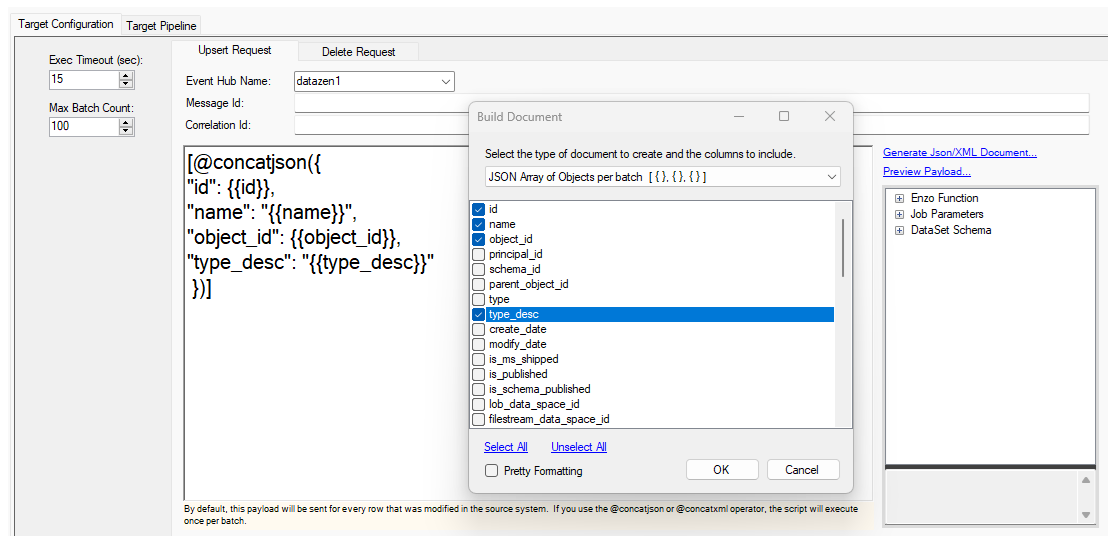
When building a JSON array of objects, use the @concatjson operator and add the surrounding
brackets. In DataZen Manager, you can also click Generate Json/XML Document..., choose
JSON Array of Objects, and select the fields to include.
[@concatjson({
"id": {{id}},
"name": "{{name}}",
"object_id": {{object_id}},
"type_desc": "{{type_desc}}"
 })]
SQL CDC example:
PUSH INTO HTTP [target] (POST /send)
ON_UPSERT
    PAYLOAD (
        [@concatjson({
            "id": {{id}},
            "name": "{{name}}",
            "object_id": {{object_id}},
            "type_desc": "{{type_desc}}"
             })]
    )
WITH BATCH 100;
Array of Arrays
Use @concatjsonarr to build an array of arrays, or choose JSON Array of Values in the
Manager helper. This format is useful for endpoints that expect arrays of values, such as Google Sheets or
some AI/ML endpoints.
[@concatjsonarr([ {{id}}, "{{name}}", {{schema_id}} ])]
XML Nodes
To build an XML document where each record becomes a child node, use @concatxml and wrap the
result in a root node. In DataZen Manager, you can also click Generate Json/XML Document..., choose
XML Document per Batch, and select the fields to include.
<root>
@concatxml(<row><id>{{id}}</id>
<name>{{name}}</name>
<principal_id>{{principal_id}}</principal_id>
<parent_object_id>{{parent_object_id}}</parent_object_id></row>)
</root>
Binary Data
Sending binary data usually requires choosing how the binary value is encoded. Unless otherwise specified,
DataZen sends binary data as a hex-encoded string. For example, if the data field contains
binary data, this payload is sent as a hex-encoded string value:
{{data}}
Use one of the following prefixes to explicitly shape the binary output:
{{ascii:data}}{{base64:data}}{{hex:data}}{{utf8:data}}{{unicode:data}}
To send binary data as a base64 string, use the base64 prefix:
{{base64:data}}
HTTP Payloads with Embedded SQL
Some HTTP systems expect the request body to contain SQL code. Databricks is a common example: DataZen sends an HTTP request whose payload contains a SQL statement to execute. This is still an HTTP payload formatting scenario, even though the payload content is SQL.
A single SQL statement can be generated per incoming row, or a batch statement can be crafted for multiple changes at once. Batching strategies vary by endpoint and SQL dialect. For example, Databricks, Snowflake, Oracle, SQL Server, and MySQL may require different generated SQL shapes.
For dedicated guidance, see HTTP SQL Payloads and the Databricks guide.
When using SQL CDC against a database connection directly, script generation is rarely needed. Prefer SINK DB or MERGE when the target can be reached through a database connection instead of an HTTP SQL API.
Script Generation using DataZen Manager
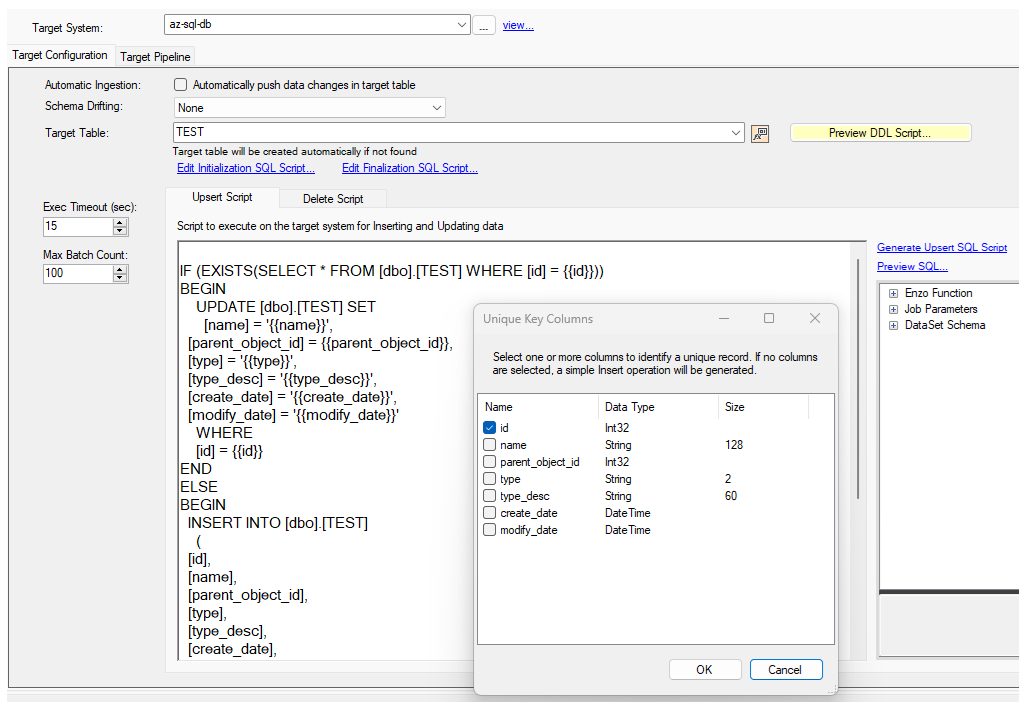
When building a SQL payload in DataZen Manager, all available fields can be scripted. You can generate an INSERT-only script or an UPSERT script. Click Generate Upsert Script, then choose the field or fields that identify a unique record. By default, the job's CDC Key Field is used as a hint to pre-select the correct fields, but you can choose different fields. If no fields are selected, an INSERT command is generated instead of an UPSERT operation.