
HTTP SQL Payloads
This feature allows you to build SQL Scripts that should be embedded as part of an HTTP Payload to merge or delete records on a target database endpoint, accessible through HTTP REST API calls, such as Databricks.
Specifying SQL HTTP Payloads in SQL CDC
To include SQL payloads in HTTP commands, either when using the APPLY HTTP or the PUSH HTTP command,
you need to use one of the available @sql functions. See the Payload Formatting section of the
Development Guide for additional information.
View/Edit the SQL Script in the Management UI
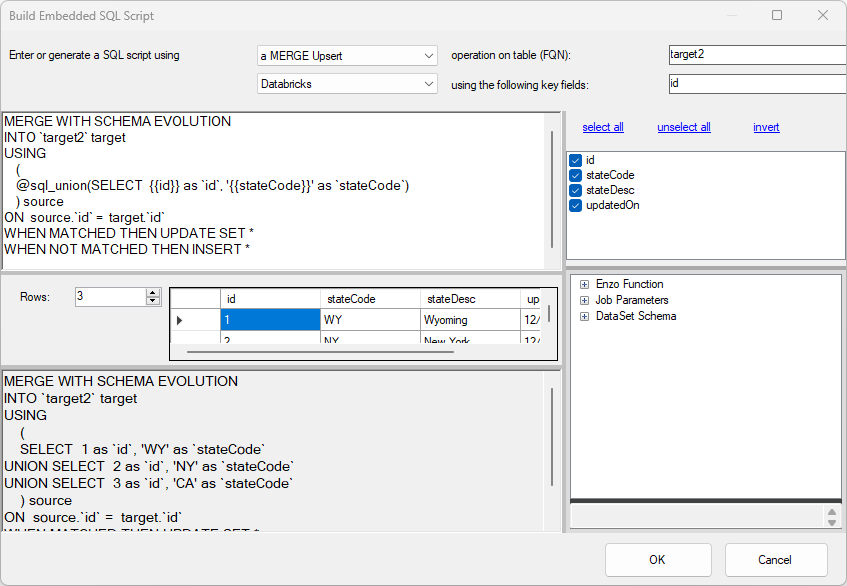
To edit an existing HTTP Payload, select the SQL command first on the payload screen before editing it. The selected text will be replaced automatically with the new SQL script upon completion.
When building the SQL script for the first time, you will need to specify the script type (Merge Append, Merge Upsert, or Delete), the scripting engine (ex: Databricks), the table name, the fields to use when using a MERGE operation, and the Key field for the Merge Upsert and Delete operations. Changing any of these values will automatically update the script. You can preview the script being generated in the bottom part of this screen; changing the number of rows to be displayed will simulate the Max Batch Count setting so you can inspect the script visually.
The script generated will automatically include the batch operator (@sql_union or @sql_concat) needed to build the expected final SQL command. However, it will not automatically add the #singleline() function; you must add this function if you are building a JSON document.