Pipeline Jobs: Overview
A pipeline job (also called a pipeline) typically reads from a source system and writes to a target system. Depending on the integration pattern, those operations can run separately or together as a Direct job. Specialized pipeline types also exist for messaging and for background or monitoring workloads.
Classic UI vs SQL CDC
DataZen provides two ways to manage pipelines:
- Classic screen-based configuration — available only for self-hosted agents. These pipelines are still supported for existing deployments.
- SQL CDC scripting — available for both self-hosted and cloud agents. SQL CDC is the preferred approach for all new pipelines, except Messaging pipelines (self-hosted only).
Because of DataZen’s decoupled architecture, the read and write sections of a SQL CDC script are independent of each other even when they appear in one script. For more information, see SQL CDC Introduction.
| Capability | Classic UI | SQL CDC |
|---|---|---|
| Cloud agents | Not available | Supported |
| Self-hosted agents | Supported | Supported |
| Preferred for new pipelines | Existing deployments only | Yes (except Messaging) |
| Messaging pipelines | Supported (self-hosted) | Not available |
| Headless pipelines | Not available | Preview (both agent types) |
| In-memory ETL | Inline / Inner only (per page) | Inline (per page) and After Block (full dataset) |
Pipeline Types
- Reader — reads from a database, drive/FTP (files), HTTP/S endpoint, or Big Data table and typically produces Change Logs.
- Writer — writes to a database, drive/FTP (files), HTTP/S endpoint, or Big Data table. A writer may also act as a webhook.
- Direct — combines a Reader and a Writer into one pipeline.
- Messaging Consumer — a Reader that consumes messages from a queuing platform and optionally forwards them to a target system. Messaging is available on self-hosted agents only.
- Passthrough Consumer — a specialized Direct job that acts as a Messaging Consumer and pushes messages into another queuing platform with automatic metadata mapping and forwarding. Self-hosted only.
- Headless (Preview) — a Reader that does not start by reading from a source system. Use Headless pipelines for monitoring systems or running background processes. Available for both cloud and self-hosted agents, but only through SQL CDC.
In its simplest form, a job pipeline reads data from a source system and sends it to a target system. You can also forward the same data to multiple systems (multicasting) by creating multiple writers. For multicasting to work, each writer’s Source Job Name must reference the original Reader that creates the Change Logs.
In-Memory ETL Differences
Classic UI pipelines and SQL CDC offer many of the same source and target configuration options, but they differ significantly in in-memory ETL capabilities.
- Classic UI pipelines support only Inline (Inner) ETL that processes data per page as it is read.
- SQL CDC supports Inline ETL (per page) and After ETL blocks that run against the entire pipeline dataset after a read or load completes. After ETL is only possible with SQL CDC.
See SQL CDC Introduction for a summary of SQL CDC and a detailed explanation of Inline vs. After ETL blocks.
Pipeline Processing
Read Pipeline
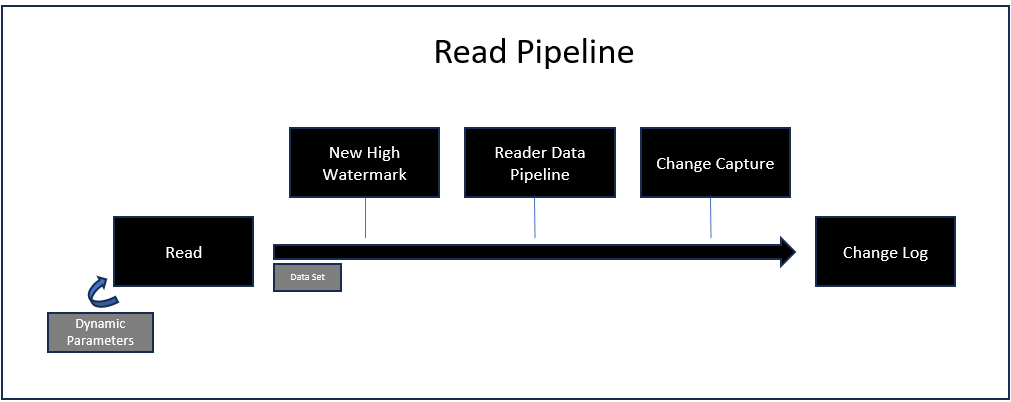
Readers (including Direct jobs and Messaging Consumers) follow the same ingestion pattern: a proactive pull from a source system to capture data and create a Change Log. The following steps take place during the read pipeline:
- Read — connects to a source system and reads data. HTTP/S readers also support dynamic parameters that can call the same endpoint multiple times. If a high watermark exists and the source system understands it, it is used here to limit the records returned. Incoming data is always turned into a dataset at this point (when raw data is captured, the dataset is returned as a single row with the payload and additional metadata). Depending on the source system, a secondary call may be required when capturing deleted records.
- High Watermark — if a high watermark is defined, the new value is calculated in this step, before the data pipeline runs. Depending on the source system and the strategy used to identify deleted records, a secondary high watermark may be tracked for deleted-record identification.
- Data Pipeline — if defined, the data returned by the source system is processed here. When Synthetic CDC is engaged, only the upsert stream goes through the data pipeline; the deleted stream is stored as-is because it normally contains only key identifiers.
- Change Capture — if CDC Keys have been defined, the Synthetic Change Capture engine runs. This can eliminate some or all incoming records. Capturing deleted records is optional and depends on first defining CDC Keys.
- Change Log — if any data remains, a Change Log is created with two internal streams: upsert and delete. The Change Log also contains metadata, schema, and optionally signature information, and may be encrypted. No Change Log is created if the incoming dataset has no records.
In a SQL CDC pipeline, a Change Log is created only when a CAPTURE operation is specified. If
the script has no CAPTURE command, it completes without creating a Change Log.
Write Pipeline
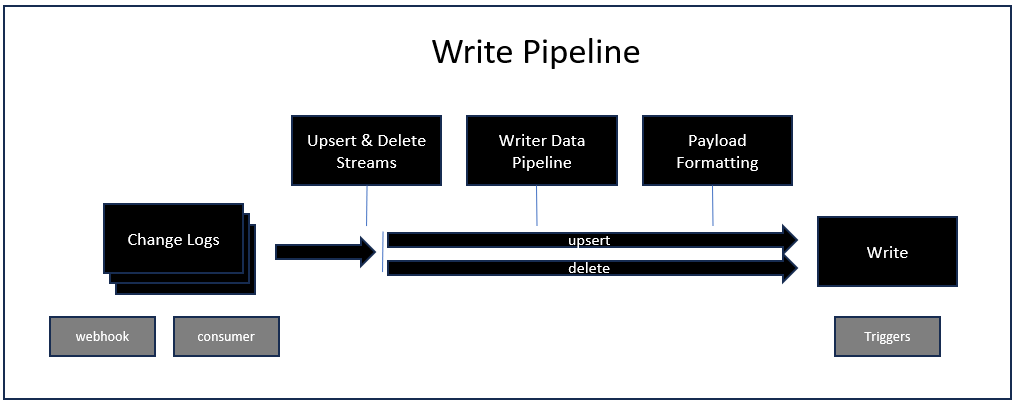
Writers (including the writer half of a Direct job) start when a Change Log is available or when a replay is requested. When a webhook exists on a writer, a Change Log is created from the webhook payload after the writer data pipeline runs. In all cases, the writer must be enabled and a Change Log must be available.
- Change Log — required to start the writer pipeline. By convention, the Change Log file name contains the name of the reader that created it and the timestamp when it was created. This ensures that only the desired Change Logs are processed, in sequence. The Change Log also stores the CDC Keys used (if any) when the data was captured.
- Data Streams — each Change Log contains two streams: new/modified data and deleted records. If the source job had no CDC Keys, only the first stream contains data.
- Writer Data Pipeline — the writer can have its own data pipeline, independent of the reader that created the Change Log. Unlike the reader pipeline, the writer pipeline runs for both data streams.
- Payload Formatting — before sending data to the target system, the writer performs additional steps that vary by target, including mini-batching, data shaping, partitioning the target object, and formatting the payload.
- Write — the write operation may run multiple times depending on the batch options for the selected target. Additional options can change default behavior based on the outcome of this step, including retry and dead-letter handling.
Multiple writers can use the same Change Logs to multicast changes to multiple targets independently.
To force-start writers when a reader completes, use Triggers.