
Pipeline Triggers
Triggers start or queue one or more pipelines after the current pipeline completes. Use them to sequence dependent pipelines, force-start writers after a reader, create processing loops, or multicast Change Logs to multiple targets.
Classic screen-based triggers are configured in DataZen Manager and are available for self-hosted agents.
SQL CDC provides the TRIGGER operation for both cloud and
self-hosted agents.
Trigger Conditions
Four conditions determine whether a configured trigger runs when the current pipeline completes:
| Condition | When the trigger runs |
|---|---|
| On Completion | Whenever the pipeline completes, whether it succeeds or fails. |
| On Success (always) | When the pipeline succeeds, whether or not it processed data. |
| On Success (with data) | When the pipeline succeeds and processed data. |
| On Failure | When the pipeline completes with an error. |
When multiple pipelines are specified as triggers, their execution order is not guaranteed.
SQL CDC: TRIGGER vs. START
SQL CDC provides two ways to launch another pipeline. The important difference is when each operation is evaluated:
STARTis executed only when the script reaches that command. It can appear at different points in a script, including inside anIFblock. If the script fails or exits before reaching theSTARTcommand, the target pipeline is not started.TRIGGERis evaluated for execution when the script completes. Its condition determines whether the target pipeline runs, including On Failure when an earlier operation caused the script to fail.
Use START when launching the next pipeline is part of the script’s immediate control flow.
Use TRIGGER when the decision must be evaluated at script completion.
Looping
Looping a pipeline in DataZen involves rerunning the pipeline as many times as needed, until no more records are available for processing. This usually works when the source of the data can progressivelly be read using a window technique such as a date range. Both Triggers and Start operations can be used.
Looping with Start
You can use the START command to start a loop; because the START operation normally executes inline (and the pipeline is still running), you need to include a DELAY to make sure the pipeline has time to complete before it starts again. However, you are responsible for detecting if any records are indeed returned before looping or you run the risk of entering into an infinite loop.
-- Keep a high watermark and order by the modified date to keep getting the next batch of records progressively
SELECT * FROM DB [sql]
  (SELECT TOP 250 name, modify_date FROM sys.tables WHERE modify_date > '@highwatermark' ORDER BY modify_date)
  WITH HWM 'modify_date';

IF (@@rowcount() > 0)
BEGIN
  -- if any records were returned, continue doing some work... and call this pipeline again
  PRINT 'Working with the next @@rowcount() records';
  START 'mypipelinename' DELAY 2 SKIP_PREVIEW;
END;
Looping with Triggers
A trigger can call the same pipeline again. This pattern is useful when a pipeline processes a subset of records at a time and can fetch the next set automatically, such as by using a high watermark or a database column as a processing flag.
To avoid an infinite loop, use On Success (with data). The trigger stops firing when the pipeline no longer has records to process.
This SQL CDC example processes records in batches and triggers the same pipeline while data continues to be
returned. The pipeline is named mypipelinename.
-- Keep a high watermark and order by the modified date to keep getting the next batch of records progressively
SELECT * FROM DB [sql]
  (SELECT TOP 250 name, modify_date FROM sys.tables WHERE modify_date > '@highwatermark' ORDER BY modify_date)
  WITH HWM 'modify_date';

-- if any records were returned, continue doing some work...
PRINT 'Working with the next @@rowcount() records';

TRIGGER 'mypipelinename' ON SUCCESS_WITH_DATA;
Configuring Triggers in DataZen Manager
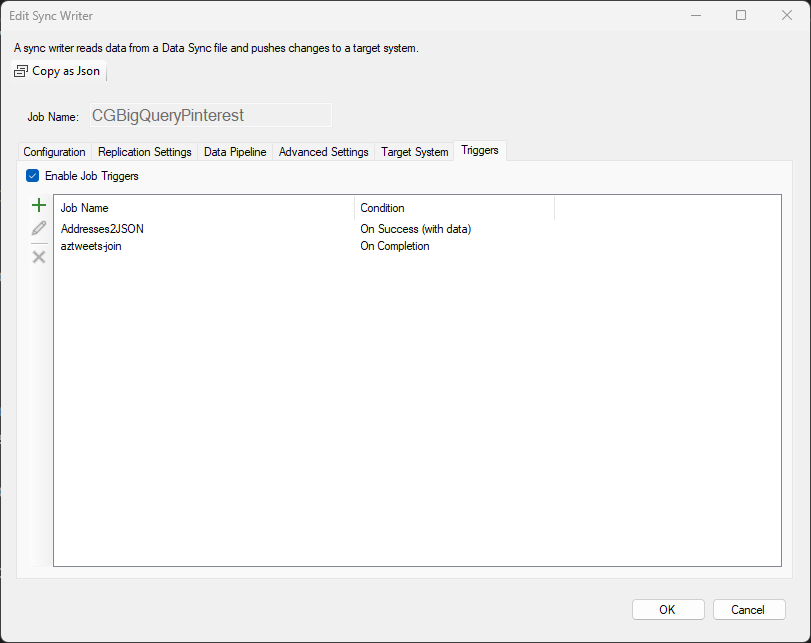
The example defines two triggers: one On Completion and another On Success (with data). Use the add, edit, and delete actions to manage trigger definitions.
Temporarily disable all triggers for the pipeline by clearing Enable Job Triggers.