
Change Capture
Change Capture (also known as Change Data Capture, or CDC) is an operation that performs a logical differential calculation based on the last known previous state of the data. Unique records are identified by one or more key columns. On each run, DataZen compares the current extract to that prior state and keeps only the net changes—useful for source systems that do not provide a native change stream or a reliable high watermark.
The CDC differential is bypassed (and the full current data set is treated as the capture result) when:
- the operation runs for the first time (there is no previous state to compare against)
- a data engineer performs a reinitialization (resync) of the capture state
- no key columns are specified—in which case all records are always captured on every run
The relationship to the change log is straightforward: the output of the Change Capture operation is stored in the change log, along with the schema of the data and additional metadata that identifies the content of that log. In other words, a change log is created only when the Change Capture operation returns at least one record.
Using SQL CDC
When using SQL CDC, you engage Change Capture by using the CAPTURE command and specifying the
ON KEYS option. Omitting the ON KEYS option will create a change log without
engaging the Synthetic CDC engine and as a result capture the entire data set.
You can limit which fields are observed for change identification using the OBSERVE keyword.
This option can be useful when certain field values always change (such as a timestamp) but shouldn’t
be used for change identification.
See the CAPTURE operation for details.
Using the Classic UI
The following settings apply to classic pipelines configured in DataZen Manager. Equivalent options are
available when using SQL CDC through the CAPTURE command described above.
How to Engage CDC
To engage the automatic Synthetic CDC in a Job Reader, use the CDC Key Columns setting
under the Replication Settings tab. One or more columns can be specified.
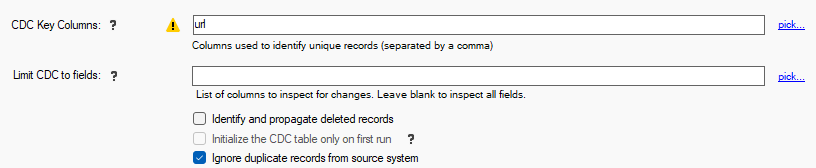
Changing these Key Columns after a job has run once may cause unpredictable results. You can force a full resync operation to recreate the internal CDC table.
Limit CDC Fields
By default, all fields from the source data pipeline are observed during the CDC operation; if any field changed
the record will be marked as modified. In certain scenarios, it may be necessary to only inspect a few fields for
changes. This allows you to control the fields that the CDC will observe for changes.
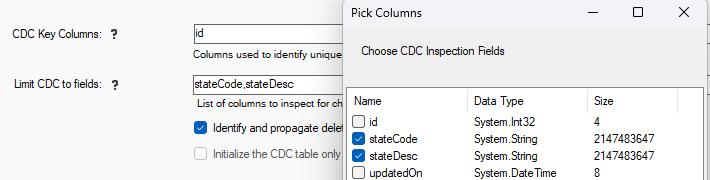
Changing these Key Columns after a job has run once may cause unpredictable results. You can force a full resync operation to recreate the internal CDC table.
How to Disengage CDC
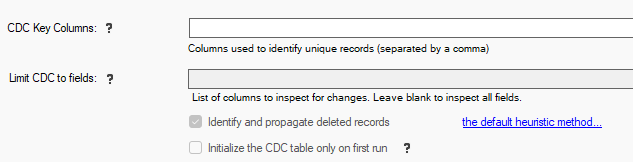
To disengage the automatic Synthetic CDC in a Job Reader, clear the CDC Key Columns setting
under the Replication Settings tab.
Ignoring Duplicate Records from the Source System
In rare cases, source systems may return duplicate records over time for key values that are supposed to be unique, either due to paging requests
that overlap slightly or as a result of an issue with the source system itself returning duplicate records unexpectedly. Since engaging CDC
results in identifying unique records by design, processing duplicate records will throw an error (ERR-STG-005) and the data pipeline will
stop with an error.
You can use the Ignore duplicate records from source system option to discard duplicate records extracted from the source system.
Doing so will process the first record for a given set of CDC Key Columns and discard any additional records from the source data during the pipeline execution.
Using this option may cause performance degredation when dealing with large recordsets. In addition, if the duplicate records as identified by their unique key columns contain different data in other colums, data loss may occur. As a result, using this option should be used when you have no other practical way to eliminate the undesired duplicate records.
Unless special measures are taken, a Job Reader will create a Change Log that contains all the source records, which is also referred to as an Initial Sync file. A Resync operation also creates a Change Log with a complete set of records from the source system.
When the Synthetic CDC option is disengaged, all records detected from the source system are forwarded to the Sync File, unless the Job Reader has a High Watermark defined (Timestamp, DateTime or a Long value).
CDC State Table
When one or more Key Columns are specified in a Job Reader, the data read from the key columns are hashed and stored seperately in a database table to keep state information.
The CDC state table is used to detect any changes made to the source records, including any data updates, column changes (including data type). Although this state table contains limited information (mostly hash values), the number of records to be stored in this table may be very large depending on the source system.
The Synthetic CDC engine is capable of identifying "net" changes between two time intervals, including deleted records when the option is selected. The outcome of the differential analysis performed between two time intervals is stored in the Change Log.
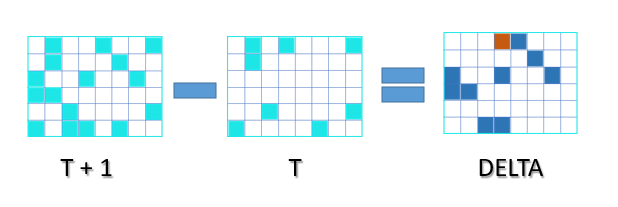
Because DataZen calculates "net" changes only, the identification of an inserted versus updated record may not always be possible. As a result, the Change Log contains two types of changes: upserted and deleted. It is up to the target system to perform an insert operation if the record is missing, or an update operation if the record is already present.