
Webhook
DataZen allows jobs to implement an HTTP/S listener as an incoming webhook to process data regardless of the source, when the source system pushes events or payloads. This capability is useful to implement real-time data integration use cases for both cloud-based and hosted scenarios.
This feature supports the Stateless Hook pattern described in this section.
Cloud agents require a specific authentication header; your Enzo online account must be enabled for such access. Please contact support for more information.
Webhook Features
Webhooks are implemented as an API HTTP/S handler in DataZen (see the OpenAPI 3.0 specification for /job/push) and is available for GET, POST, PUT, PATCH and DELETE HTTP operations. For security reasons, a job must be enabled to accept Webhooks. Both Direct jobs and Job Writers can be set as webhooks, but Job Readers alone cannot; a Writer must exist. Conceptually, a DataZen Webhook creates a Change Log, which makes the webhook replayable and can leverage signature and encryption security settings.
Call Options
A webhook accepts the incoming payload and processes the Data Pipeline defined, if any. However, the webhook does not apply the
default Synthetic Change Capture. Nevertheless, any number of transformations can be applied after the CAPTURE operation in a SQL CDC script.
Some of the options include:
- form2json: when an
x-www-form-urlencodedcontent type is detected, the payload is automatically transformed into a JSON document. Passform2json=0in the query string to disable this behavior - bypasstriggers: when specified as a query parameter, this option bypasses triggers defined on the job, if any
- rootpath: when specified as a query parameter, this option further transforms a JSON or XML payload into a dataset
- startwriter: by default, the writer starts automatically; however, when specified, this option provides the ability to create the change log without starting the writer operation
The webhook identifies the target job with the guid query parameter. If guid is not provided, the jobKey parameter must be found instead.
Job triggers, if any are defined, will be processed unless the bypasstriggers option is set. For example, the following webhook call will bypass triggers and transform any incoming payload into a data set from the JSON document provided:
POST https://localhost:9559/job/push?guid=9e35afe9d6e54c6a9e812280555ebf8f&bypasstriggers=1&rootpath=$ HTTP 1.1
The Job must be enabled for the webhook to operate successfully. In addition, this option does not log incoming HTTP requests at this time; if advanced troubleshooting is needed, an HTTP tracing utility may be required.
Job Writers
Job Writers can be configured as a webhook exclusively. This is the preferred implementation of this pattern as it is the simplest to define and maintain. To implement a Job Writer webhook, create a new Job Writer and provide a sample payload input. Once the sample payload has been provided, the option to enable the webhook will be displayed.
Once defined, the webhook can receive incoming requests through an HTTP operation that provides the job guid (or jobKey if guid is omitted) in the HTTP query. For example, if a Job Writer Guid is 9e35afe9d6e54c6a9e812280555ebf8f, the following POST operation would trigger a webhook call:
GET https://localhost:9559/job/push?guid=9e35afe9d6e54c6a9e812280555ebf8f HTTP 1.1
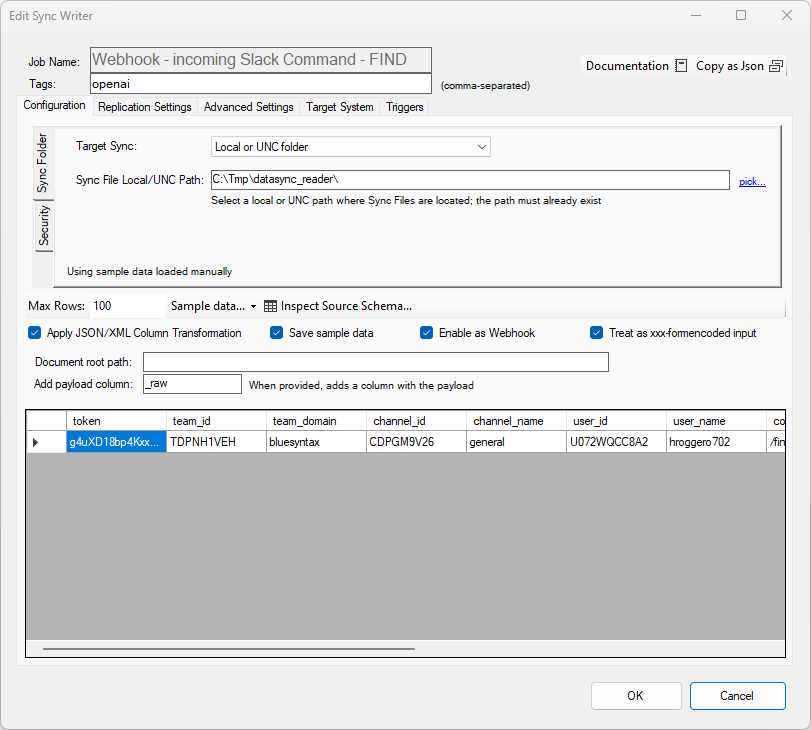
The xxx-formencoded input option becomes available when defining a webhook. This option is only meaningful on the Manager
interface to preview the sample payload. When the webhook receives an x-www-form-urlencoded Content-Type payload,
the content is automatically transformed into a JSON document. Pass form2json=0 in the query string to disable
this behavior.
Check the Save Sample Data option to keep the sample data as part of the job definition to make it easier to troubleshoot later.
Direct Jobs
Similarly, Direct Jobs (both a Job Reader and Job Writer) can be enabled as a webhook. To enable this option, go to the Advanced Settings tab, and select Enable as Webhook. When checked, the job can act both as a regular job and a webhook. Note, however, that the Job Reader Data Pipeline and CDC options are ignored when the webhook is triggered; only the Writer Data Pipeline will be processed.
When defining a Direct Job as a Webhook, the HTTP request must contain the guid of the Job Reader; using the Job Writer Guid will result in an error.
SQL CDC
A Direct Job webhook can also be implemented as a SQL CDC script. Use WITH WEBHOOK on the opening
SELECT so the job can accept webhook calls. When the webhook runs, the first part of the script
(the Reader / sample payload section before CAPTURE) is ignored at execution time. That
section is only useful for testing purposes during preview operations, to share a sample payload that matches
what the webhook call is expected to send. Live webhook processing starts at CAPTURE and continues
with the remaining statements.
A PUSH operation is required for webhooks to function. If no PUSH is specified, the
pipeline will still be created and a Change Log may be created when CAPTURE is used in the script.
This allows Writer Pipelines to be decoupled from the webhook call.
Known limitation: Triggers only fire if a PUSH is defined on the webhook pipeline.
Example: an x-www-form-urlencoded payload is automatically converted to JSON (unless
form2json=0), then transformed into a dataset and merged into a target table.
Adding DISCARD_ON_SUCCESS on the PUSH operation automatically deletes the Change Logs
created for that call after a successful write.
SELECT * FROM DB [sqlserver]
(
  -- sample payload we are expecting from the webhook call
  SELECT 'id=1&data=12%203456789&id=2&data=1234567890' as formEncodedPayload
) WITH WEBHOOK ;

CAPTURE;
-- The live webhook call actually starts from this point on
-- Assuming the payload is x-www-form-encoded
-- the automatic JSON conversion gives us a JSON payload

-- Let's transform the JSON payload into a data set
APPLY TX '$' ON '0';

PUSH INTO DB [sqlserver] TABLE 'hook.push' AUTO_MERGE DISCARD_ON_SUCCESS;