
VS Code Extension
DataZen includes a Visual Studio Code extension that lets data engineers and developers build SQL CDC scripts directly in VS Code. You can create new pipelines, edit existing ones, publish them to the DataZen agent you are connected to, preview execution with debug output and data results, and optionally use source control through VS Code’s existing GitHub integration. The extension works with both self-hosted and cloud agents.
Install the extension from the
Microsoft Marketplace
inside VS Code (search for Enzo DataZen / EnzoUnified.datazen-sqlcdc).
What You Can Do
- Create new SQL CDC pipeline scripts in the VS Code editor
- Open and edit pipelines that already exist on a connected DataZen agent
- Publish pipelines directly to the agent
- Preview script execution with debug output and a data preview
- Optionally manage scripts under source control with VS Code’s GitHub integration
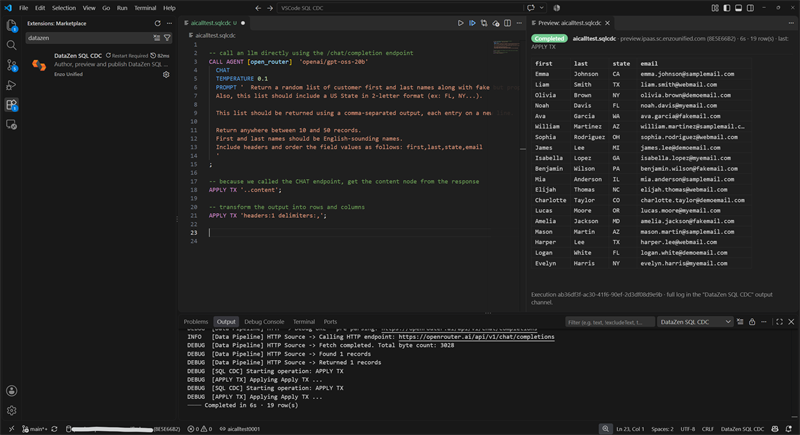
The screenshot below shows a SQL CDC script open in VS Code with debug output and a data preview on the
right. In this example, the script calls an AI agent through an open_router connection to
generate a random dataset of users (name and email).
Connect to a DataZen Agent
To add or edit a DataZen connection, run Connect to DataZen Agent or
Edit DataZen Agent Connection from the Command Palette (Ctrl+Shift+P). When connecting
to a cloud agent, the Agent ID is required.
Workspaces and Multiple Agents
When working with multiple DataZen agents, create a separate VS Code workspace for each agent so the local copies of your SQL CDC pipeline scripts can be managed independently. Also mark the workspace as trusted in VS Code (trust the workspace when prompted) so the extension and related tooling can run normally.
Preview Behavior
The VS Code SQL CDC editor can preview the execution of a script. By design, certain operations are bypassed
automatically during preview — including CAPTURE and PUSH — so you can
validate logic and inspect intermediate data without writing Change Logs or updating targets.
Security and Required Scopes
Administrators should limit developers to a specific list of API scopes. At a minimum, assign the following scopes so developers can connect, inspect connections, work with SQL CDC, and publish pipelines:
connections_listsql_alljob_all(required to publish)
Administrators can issue dedicated Service Tokens with these scopes, or assign the roles to an AD Group using DataZen Manager. AD Groups are available for self-hosted agents only.
See Security for Service Tokens and related controls.