
X.509 Certificates
DataZen uses X.509 certificates for three purposes: encrypting data (such as Change Logs and environment variables), signing data and requests, and authenticating clients to the DataZen agent API. Certificates and connection strings are always stored encrypted inside DataZen using AES.
Both the Web Portal and DataZen Manager let you import existing certificates and generate self-signed certificates for encryption or signing, and both let you enable a certificate for authentication to the DataZen API. Only DataZen Manager can configure signing-only mode against a self-hosted agent, and only self-hosted agents expose a local Windows certificate store — cloud agents (and therefore the Portal) do not offer a localhost store.
Where Certificates Are Used
| Usage | Where it is stored | Notes |
|---|---|---|
| HTTP/S connections | With the connection string | The certificate is loaded and saved in its entirety as part of the encrypted connection string. See X.509 Certificates for HTTP/S. |
| Change Log encryption and signing | Certificate store | Stored in the encrypted certificate table in DataZen. On self-hosted agents, certificates may also come from the local Windows store. |
| Environment variable encryption | Certificate store | Environment variables can be encrypted with a certificate. See Environment Variables. |
| Agent API authentication and signing | Certificate store | A registered certificate can be enabled for authentication and used to sign agent requests. See the sections below. |
Cloud agents do not offer a localhost store; all certificates are stored encrypted in the DataZen database.
Managing Certificates
You can register and create certificates from either the Web Portal or DataZen Manager. Both experiences support importing an existing PFX certificate and generating self-signed certificates for encryption or signing.
Web Portal
For cloud agents, open Configuration → Certificates in the agent Portal. Use New to import a certificate or generate a self-signed certificate, Delete to remove a selected certificate, and Refresh to reload the list. Each row shows the thumbprint, common name, expiration, capabilities (such as Private Key and Sign), and an Auth column.
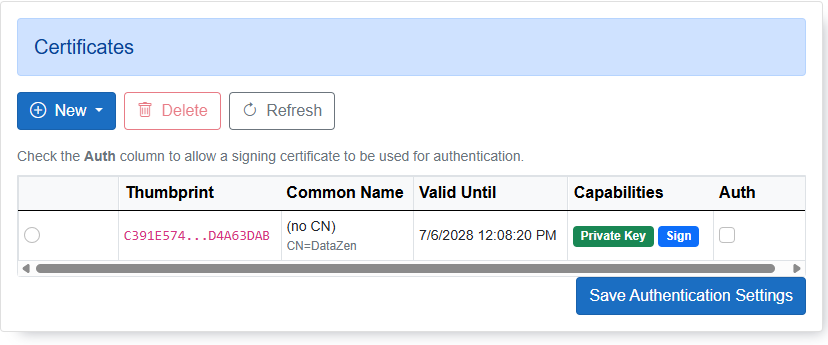
Check the Auth column and choose Save Authentication Settings to allow a signing certificate to be used for authentication to the agent API.
DataZen Manager
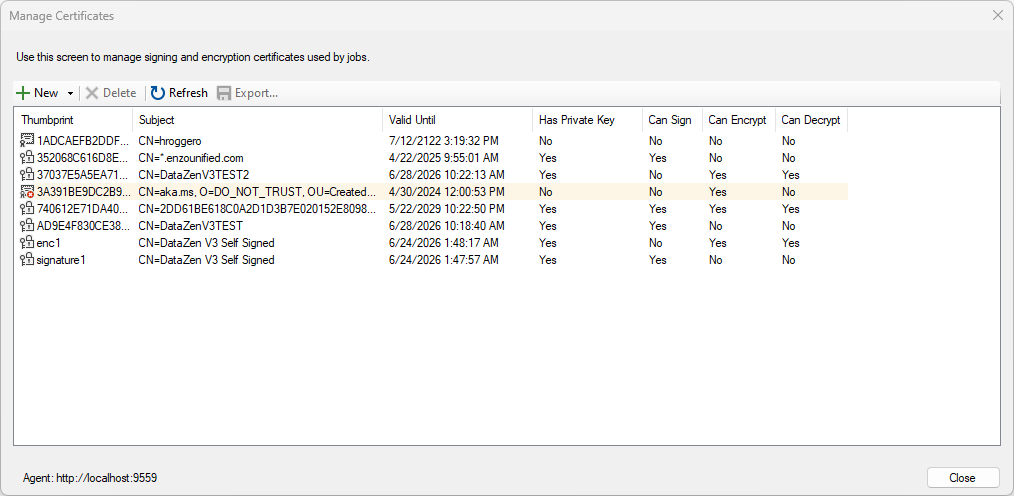
For self-hosted agents (or when managing cloud agents from the desktop), open Configuration → Security → Manage Certificates... in DataZen Manager. This screen manages the signing and encryption certificates used by jobs, and shows whether each certificate has a private key and can sign, encrypt, or decrypt.
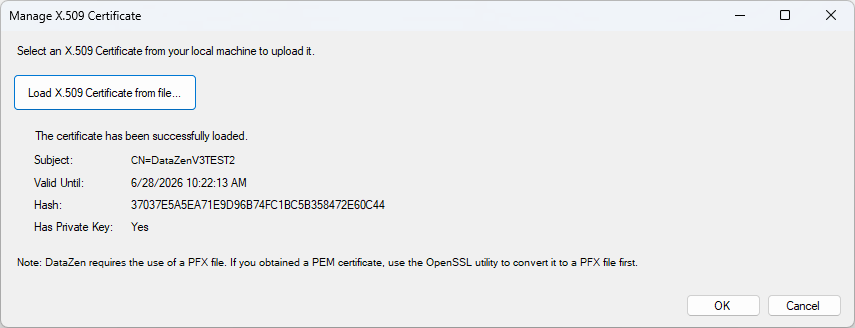
Import a PFX certificate
Choose New → Import PFX From File and select your certificate. If the certificate is password protected, you are prompted to enter the password.
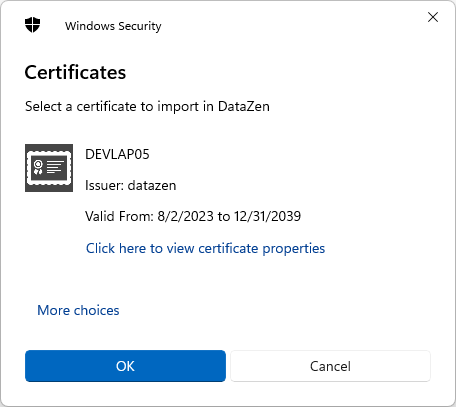
Import from the Windows certificate store
Choose New → Import from Certificate Store and pick a certificate from the Local Machine
or Current User My store. This option is available for self-hosted agents only; cloud
agents do not offer a localhost store.
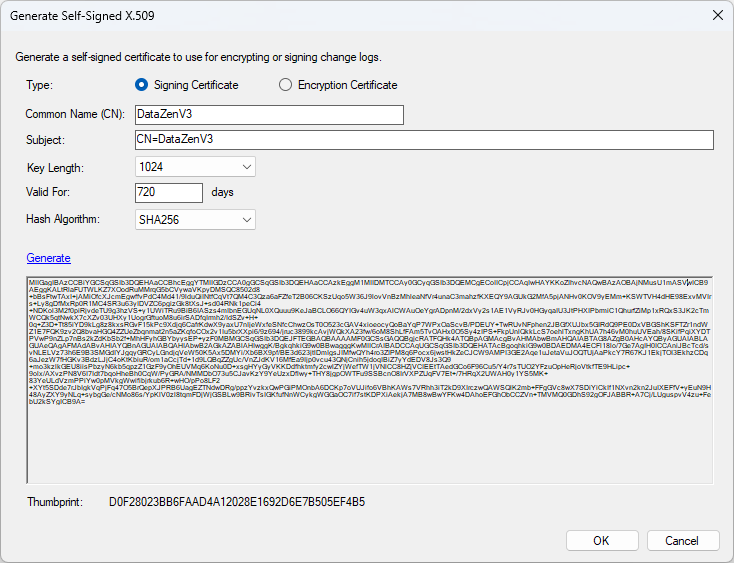
Create a self-signed certificate
Choose New → Generate Self-Signed Certificate, then select the key length and whether the certificate is for encryption or signing.
X.509 Certificates for HTTP/S Connections
Some HTTP/S endpoints require a client X.509 certificate for enhanced security; for example, connecting to ADP requires a certificate. When a certificate is used for this purpose, it is loaded and saved in its entirety as part of the connection string in DataZen, rather than in the central certificate store.
When you copy and paste connection strings, the full connection is copied in memory, including any certificate.
For details, see X.509 Certificates in the HTTP/S section.
X.509 Certificates for Agent Authentication
DataZen agents support client authentication using an X.509 certificate. To use a certificate for authentication, it must first be registered with the agent and then explicitly enabled for authentication — in the Portal, check the Auth column and choose Save Authentication Settings; in DataZen Manager, enable it on the certificate/authentication settings.
If a certificate is registered but not enabled for authentication, it cannot be used to connect. Attempting to authenticate with it returns a "certificate not found" error.
From PowerShell scripts or HTTP clients, specify the certificate by its thumbprint (hash) in the https-Client-Certificate HTTP header. Authenticating with a certificate also requires signing, so the X-API-DateTime and X-API-DateTimeHash headers must be provided as well (see the signing section below). This applies to both cloud and self-hosted agents.
To use certificate authentication, the following conditions must be met:
- The certificate is registered with the agent and has a Digital Signature key usage extension.
- The certificate is enabled for authentication on the agent (Portal Auth column, or Manager).
-
The certificate is installed with its private key in the local
Mycertificate store (Current User or Local Machine) on the client machine. - The connection to the agent is configured to use this certificate for authentication.
X.509 Certificates for Connection Signing
DataZen agents support signing connection requests with an X.509 certificate. Signing is used alongside Token authentication to add an extra layer of assurance that client machines are authorized for access. It is also required whenever you authenticate with a certificate.
Signing on its own (without certificate authentication) can be configured against self-hosted agents only, not cloud agents. However, both cloud and self-hosted agents require the signing headers when you authenticate with a certificate.
Enabling an X.509 signing requirement means all Token-based connections must be signed.
The following HTTP headers must be provided:
- https-Client-Certificate: the thumbprint of the X.509 signing certificate to use.
- X-API-DateTime: the current UTC timestamp in ISO 8601 format. The value must be within 5 minutes of the current time on the server where the agent is running.
- X-API-DateTimeHash: the base64 string representation of the signature of the X-API-DateTime value, signed with the X.509 certificate using the SHA1 algorithm. Signing requires the certificate’s private key.
Self-hosted agents allow NTLM authentication to their API unless an Authorization header is
present. If the anonymous flag is set for the agent, X.509 authentication and signing headers are ignored.
To use signing, the following conditions must be met:
- The certificate is registered with the agent and has a Digital Signature key usage extension.
- The agent is configured to require signing from the desired X.509 certificates.
-
The certificate is installed with its private key in the local
Mycertificate store (Current User or Local Machine) on the client machine.