
AI Client NPM Settings
This page documents the npm-based REST connection model. External MCP clients such as Claude
Desktop, Cursor, and Hermes connect through local stdio MCP
servers (datazen-pipeline-mcp
and
datazen-api-mcp).
These local servers call the DataZen REST API and authenticate with the same environment variables. This
page shows where to find each value in the Portal or DataZen Manager and how to assemble the MCP server
block in your client configuration.
For Agent → Pipeline connections, direct JSON-RPC 2.0 is recommended for simpler configuration. See AI Client Remote MCP Settings. Use the settings on this page when the npm-based REST model is required.
For the full variable reference and client-specific notes, see the datazen-pipeline-mcp npm page. After credentials are in place, expose pipelines with Pipelines as Tools or register API control-plane tools with DataZen API Tools.
Cloud Agent
Typical MCP server settings for a cloud agent using datazen-pipeline-mcp:
{
  "mcpServers": {
    "datazen-pipeline": {
      "command": "npx",
      "args": ["-y", "datazen-pipeline-mcp"],
      "env": {
        "DZ_AGENT_ID": "<your agent id>",
        "DZ_CLIENT_ID": "<your client id or customer key>",
        "DZ_SECRET": "<your service token>",
        "DZ_FUNCTIONS_BASE_URL": "https://<environment>.ipaas.sc.enzounified.com/api"
      }
    }
  }
}
DZ_DEPLOYMENT set to cloud is optional for cloud agents because cloud is the
default deployment mode.
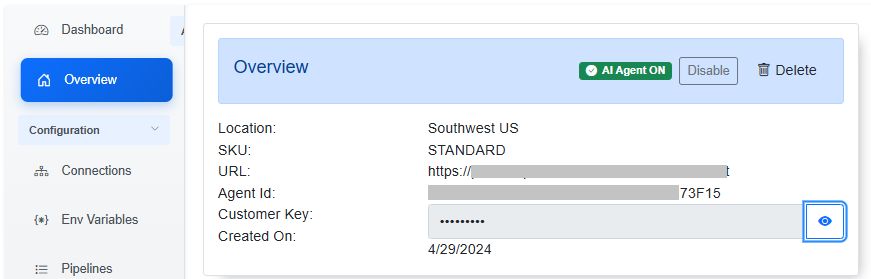
DZ_AGENT_ID, DZ_CLIENT_ID (also called Customer Key), and the agent base
URL for DZ_FUNCTIONS_BASE_URL are shown on the agent Overview page in the Portal:
Self-Hosted Agent
Typical MCP server settings for a self-hosted agent:
{
  "mcpServers": {
    "datazen-pipeline": {
      "command": "npx",
      "args": ["-y", "datazen-pipeline-mcp"],
      "env": {
        "DZ_DEPLOYMENT": "selfhosted",
        "DZ_CLIENT_ID": "Token",
        "DZ_SECRET": "<your service token>",
        "DZ_FUNCTIONS_BASE_URL": "<your self-hosted agent url>"
      }
    }
  }
}
Self-hosted agents omit DZ_AGENT_ID. Set DZ_DEPLOYMENT to
selfhosted and point DZ_FUNCTIONS_BASE_URL at the agent URL (for example
http://localhost:9559 for a local agent). Do not append /api for
self-hosted URLs.
Environment Variables
DZ_CLIENT_ID
- Cloud agent — the Client Id (also called Customer Key) from the agent Overview page in the Portal (see screenshot above).
- Self-hosted agent — the authentication scheme. Set this to
Token.
DZ_SECRET
A Service Token issued from the Portal (Administration → Service Tokens) or from DataZen Manager. See Security Overview for how to create and scope tokens.
When issuing a Service Token for an MCP server, select at least these scopes:
agent_ping_readconnections_listjob_data_listjob_listjob_readjob_run
You can use an Admin Token instead of a Service Token, but that is not recommended: Admin Tokens do not expire (though they can be rotated). Prefer a scoped Service Token with an expiration date.
DataZen API Tools may require additional scopes when the agent needs to start, stop, or activate pipelines. Issue a separate token with the least privilege required for each MCP server.
DZ_FUNCTIONS_BASE_URL
- Localhost agent — the URL of the agent, for example
http://localhost:9559. No trailing/api. - Self-hosted agent — the agent URL (for example
https://myagent.example.com:9559). No trailing/api. - Cloud agent — the agent URL from the Overview page in the Portal. Append
/apiif the URL shown on Overview does not already include it (for examplehttps://<environment>.ipaas.sc.enzounified.com/api).
DZ_AGENT_ID
Required for cloud agents only. Copy the agent id from the agent Overview page in the Portal. Omit this variable for self-hosted deployments.
DZ_DEPLOYMENT
Set to selfhosted for self-hosted agents. For cloud agents, omit the variable or set
cloud (the default).
Using the Same Credentials for API Tools
datazen-api-mcp uses the same environment variables when
DZ_FUNCTIONS_BASE_URL ends with /api on cloud agents. Register a second MCP server
block with datazen-api-mcp as the command. See
DataZen API Tools for the API tool list and Hermes
whitelisting options.