
AI & Agentic Overview
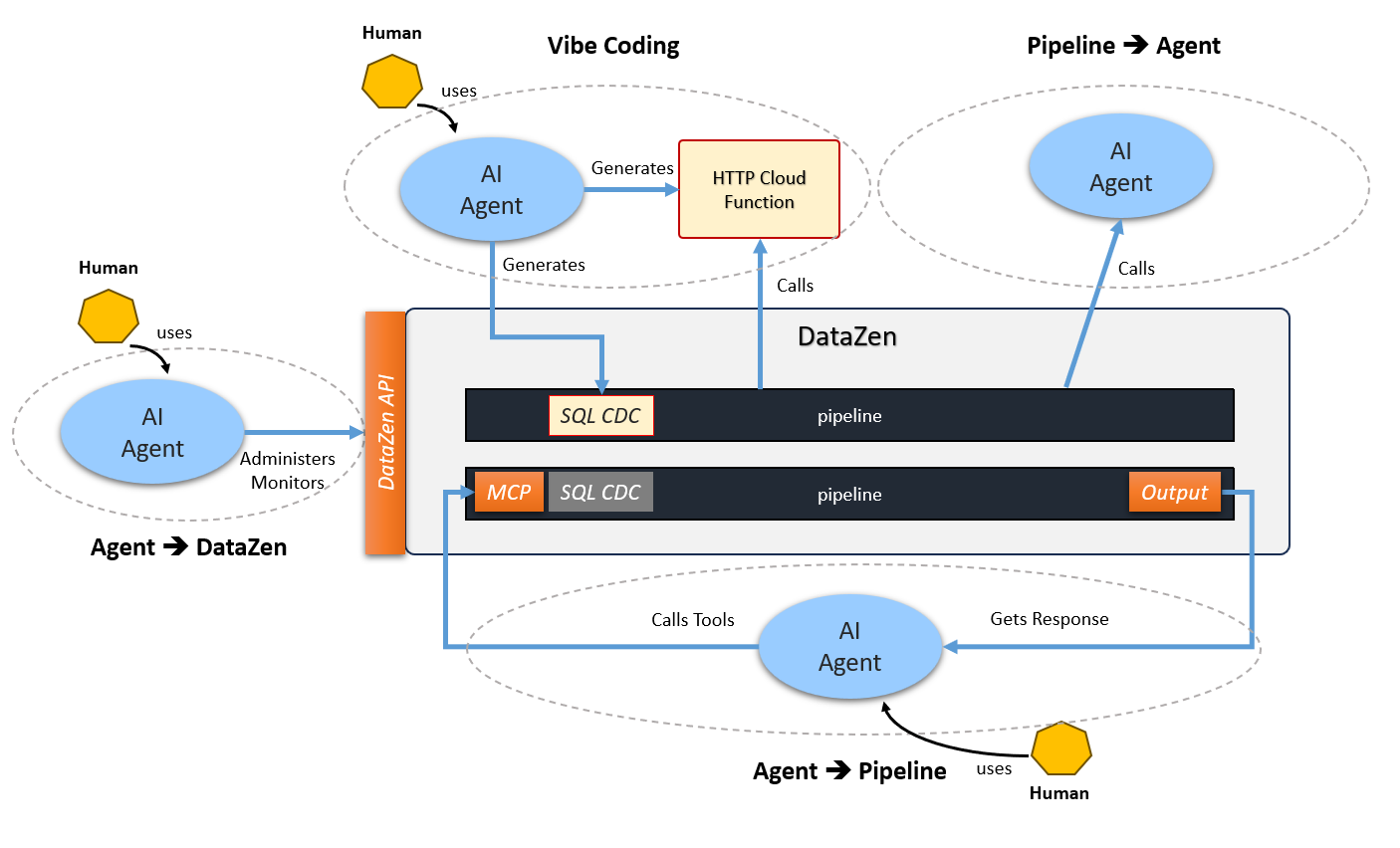
DataZen extends beyond classic data integration into AI and agentic workflows. The same governed pipelines that move data can call external agents and process responses, be exposed as MCP Tools, and be administered by agents through the DataZen API, while assistants can author SQL CDC and cloud functions that pipelines invoke.
Four complementary usage patterns cover the main scenarios:
DataZen supports both REST-based integrations and direct JSON-RPC 2.0 connections from AI clients such as Copilot, Cursor, and Claude Desktop. At this time, direct JSON-RPC 2.0 connectivity applies only to the Agent → Pipeline pattern, for pipelines exposed as MCP tools. It is available in both cloud and self-hosted editions.
| Use case | What it does | npm package / capability |
|---|---|---|
| Vibe Coding | Build SQL CDC scripts with your favorite agent, and/or generate external HTTP cloud functions that pipelines can call later. For script generation, agents use the SQL CDC language specification via MCP. | datazen-sqlcdc
(SQL CDC generation; cloud functions are built outside DataZen) |
| Pipeline → Agent |
A running pipeline invokes an LLM through an AI Endpoint using
CALL AGENT or APPLY HTTP—for classification, enrichment, summarization, or other
inline decisions—without requiring a separate MCP package. And the pipeline can
also process the response if desired to continue its processing.
|
CALL AGENT or APPLY HTTP
(no npm package) |
| Agent → Pipeline | Expose Reader or Direct pipelines as MCP Tools (Pipelines as Tools). Develop and test them in Portal AI Chat, then connect Claude, Hermes, Cursor, and other agents to live pipeline results using the recommended JSON-RPC 2.0 connection or the REST-based npm server. |
Recommended: native JSON-RPC 2.0
Alternative: datazen-pipeline-mcp |
| Agent → DataZen API | Let agents call the DataZen HTTP API as MCP tools for cloud and self-hosted agents—health, jobs, history, variables, and start/stop/activate operations (DataZen API Tools). | datazen-api-mcp |
The three MCP servers are published under the Enzo Unified npm organization. Browse the packages here: npmjs.com/settings/enzounified/packages. For npm-based REST client credentials and environment variables, see AI Client NPM Settings.
Vibe Coding
Use your preferred coding agent to generate and refine integration artifacts. With
datazen-sqlcdc, the assistant has first-class access to the SQL CDC language specification
(list_operations, get_operation, get_examples) so it can produce
correct scripts instead of guessing. You can also have AI generate external HTTP cloud functions
(or similar endpoints); once deployed, a pipeline can invoke them over HTTP just like any other remote
service.
No agent credentials are required for the language-spec MCP server. See AI-Generated SQL CDC for package setup and examples.
Pipeline → Agent
Pipelines can call an LLM mid-flight without exposing the pipeline as a tool. Configure an HTTP/S
connection as an AI Endpoint, then use the SQL CDC CALL AGENT operation to send a prompt
(and optional context from the current row or pipeline state) and receive a model response inline. That
response can drive filters, branches, new columns, or downstream writes.
This pattern does not require an npm package: runtime is entirely inside DataZen. See CALL AGENT and HTTP Connection: AI Endpoint.
Agent → Pipeline
Turn governed DataZen pipelines into tools an LLM can call (Pipelines as Tools). Configure an
AI Endpoint, define MCP Tool metadata on a Reader or Direct pipeline, validate behavior in Portal
AI Chat, then connect an external AI client. Copilot, Cursor, Claude Desktop, and other compatible
clients can connect directly using JSON-RPC 2.0; this is the recommended option because it requires
less configuration. The REST-based datazen-pipeline-mcp package remains available as an
alternative. Optional DECLARE parameters become tool inputs.
Direct JSON-RPC 2.0 access requires a security token with the mcp_all scope. Connect the AI
client to /mcp for a self-hosted agent, or to {agentid}/api/mcp for an iPaaS
cloud agent. See
AI Client Remote MCP Settings,
Pipelines as Tools and
MCP Tool.
Agent → DataZen API
Operate the agent control plane from an LLM (DataZen API Tools): ping and status, list jobs, read
history and logs, inspect variables and connection metadata, and start, stop, or activate pipelines. Works
for both cloud and self-hosted deployments via datazen-api-mcp and a Service Token. See
DataZen API Tools.
How They Fit Together
- Use Vibe Coding to author SQL CDC scripts and optional cloud functions that pipelines will run.
-
Use Pipeline → Agent when a pipeline needs an LLM decision or enrichment during execution
(
CALL AGENT). - Use Agent → Pipeline to let external agents query or act through governed pipelines as MCP tools.
- Use Agent → DataZen API when the agent must manage or observe the DataZen agent itself.
Many agentic setups combine several patterns and two or three MCP packages in the same client configuration.