
HTTP Connection: Custom Headers
Custom headers can be defined on HTTP/S connections for both cloud and self-hosted agents. The settings experience differs between the Web Portal and DataZen Manager, but the purpose is the same: attach additional HTTP headers to requests that use the connection.
Header values on the connection are defaults. If a pipeline specifies the same header keys, the pipeline values override the connection defaults for that run.
Header values may use DataZen Functions where dynamic values are required.
Web Portal
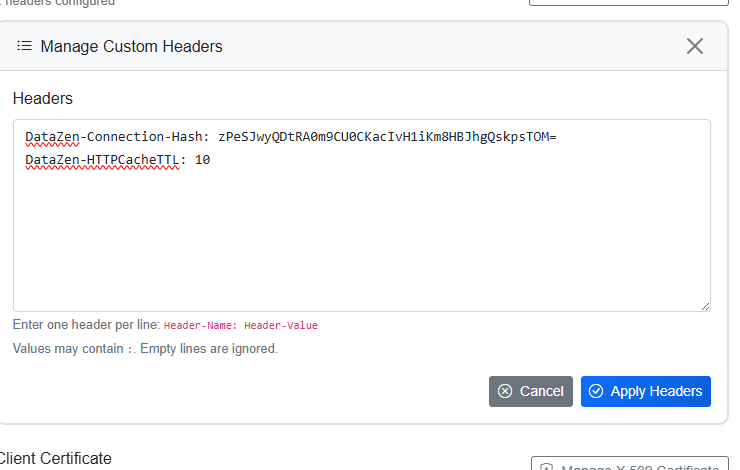
In the Web Portal, open the HTTP connection and choose Manage Custom Headers. Enter one header per
line in key: value format. Values may contain the : character. Empty lines are
ignored.
Cloud Agent System Headers
Cloud agents automatically add two headers on all HTTP connections:
DataZen-Connection-HashDataZen-HTTPCacheTTL
Both values are set and controlled by DataZen and should be treated as opaque settings. Changing or removing these headers has no effect; DataZen continues to manage them.
DataZen Manager
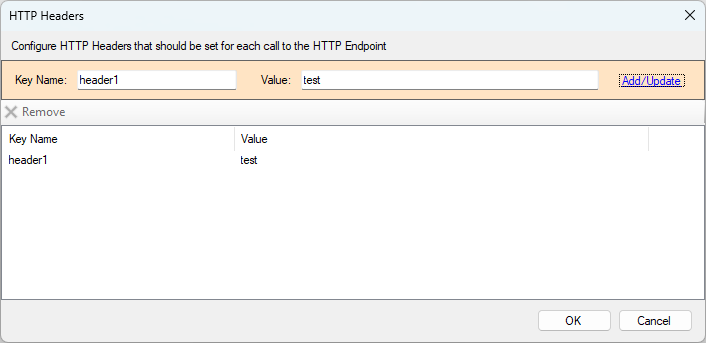
In DataZen Manager, open the HTTP Headers dialog for the connection. Enter a Key Name and Value, choose Add/Update to add or change the entry in the list, then click OK to save. Use Remove to delete a selected header from the list.
Pipeline Overrides
Connection headers apply as defaults for jobs that use the connection. When a pipeline defines the same header keys, those pipeline values take precedence for that execution.
Related HTTP/S Configuration
- HTTP/S Connection — authentication modes and shared HTTP/S connection settings.
- Rate Limiting — control call frequency against the endpoint.
- AI Endpoint — mark a connection as an AI/LLM endpoint for Portal AI Chat.